# Intentface

Base URL: https://www.intentface.com

Intentface is a Nordic agentic experience company. We design and build AI features that ship to production, and leave your team AI-native.

---
title: Latch — the agent harness that runs inside your product
description: >-
  Latch is the agent backend your SaaS product runs on. Ship agent features your
  customers use: behind your auth, on your database, with your choice of model.
url: 'https://www.intentface.com/latch'
site: Intentface
---

# Latch

> The agent harness that runs inside your product.

**Make your product agentic with Latch**
Own the intelligence. Ship the experience. Skip the infrastructure rebuild.
Latch is the agent backend your SaaS product runs on. Ship agent features your customers use: behind your auth, on your database, with your choice of model.

## Take a jump start to production.

Getting a response from a model is the easy part. Getting it to production is where the real work begins: conversation history that survives a refresh, runs that recover from crashes, tenant isolation that passes an audit, approvals before destructive actions, and tools connected without exposing credentials.

What starts as a two-week prototype can turn into two quarters of building infrastructure that isn't your product.

Latch is that platform, out of the box — embedded in your stack, not replacing it.

## AX first harness: Built around how people actually delegate work to an agent

### Conversation history

Persisted messages with three separate views: what you store, what the model sees, what the user sees. Internal context reaches the model without leaking into the chat.

### Durability

Lease, heartbeat, reaper, fencing, checkpointing. A run whose node dies is reclaimed and resumed. Plain TypeScript and your database, no workflow engine to operate.

### Scheduling

Agents that wake up on their own. In-process loop or a serverless cron route; the same machinery that resumes stalled runs runs your recurring work.

### Connectors

MCP servers as tools, behind a per-tenant allowlist and a vault-brokered auth flow including OAuth. Credentials never reach the model, the logs, or your telemetry.

### Approvals

Read freely, write with confirmation. The turn pauses, the human decides, the turn continues: as message state, not suspension machinery. This is what makes an agent shippable to real customers.

### Memory

Agents that stop asking users to re-explain themselves. A compiled index every turn, an episodic store they search on demand, and background consolidation that keeps it honest.

### Usage and cost

Token usage and computed cost recorded per message, per run, and in a ledger, behind a pricing seam you control. Per-tenant COGS is a query.

### Multi-tenancy

Your identity defines who owns each conversation. Latch carries that scope into storage, keeping each customer’s history, runs and usage separate. Your product stays in charge of permissions.

## Glossary

**what you store** — The lasting record of messages, tool calls, and results, separate from the views shown to the model or the user.

Example: A long conversation can be summarized for the next turn without deleting its original messages.

**what the model sees** — The instructions and conversation material assembled for a model turn. It can include internal context that never appears in the chat.

Example: The agent can receive a private instruction alongside a summary of earlier messages.

**what the user sees** — The customer-facing view of stored history, with internal and redacted messages filtered out.

Example: Your chat shows the answer while keeping internal instructions out of the interface.

**Lease** — A temporary claim that gives one worker ownership of a run. The worker must renew it to keep that ownership.

Example: If a worker disappears, its claim expires so another worker can take over.

**heartbeat** — A regular renewal of the worker’s lease, signaling that it is still handling the run.

Example: When renewals stop, the lease expires and the run can be recovered.

**reaper** — A periodic sweep that finds expired leases and releases abandoned runs for recovery.

Example: A crashed worker’s unfinished run becomes available for a new worker to resume.

**fencing** — An ownership check that blocks writes from a worker whose claim is no longer valid.

Example: An old worker wakes up late; its stale writes cannot overwrite the new owner’s progress.

**checkpointing** — Saving enough state to continue a run after its process stops. Recovery uses persisted history.

Example: A replacement worker picks up the saved task instead of losing the conversation.

**cron** — A scheduled trigger that invokes work at regular times.

Example: A morning trigger starts your daily account review, even when no user is in the app.

**MCP** — A standard interface through which an agent can discover and call tools exposed by another service.

Example: Connect a CRM tool server so the agent can look up an account through a defined tool.

**allowlist** — An explicit list of what is permitted. Anything outside the list is unavailable.

Example: One tenant can use its CRM connector without gaining access to another tenant’s tools.

**OAuth** — A way to authorize access to another service without giving the agent the user’s password.

Example: A user connects their account; the connector handles credentials outside the model context.

**compiled index** — A compact view of remembered information, prepared for inclusion in each model turn.

Example: The agent receives the user’s established preferences without searching every past conversation.

**episodic store** — A searchable collection of memories extracted from past interactions.

Example: When a user refers to a previous decision, the agent can search for the relevant memory.

**consolidation** — Background processing that organizes extracted memories and rebuilds the compact index used in later turns.

Example: New preferences are incorporated into memory after a conversation becomes idle.

**pricing seam** — The replaceable part of the system that maps measured usage to a cost.

Example: Your own rate calculation can account for the model pricing that applies to your product.

**COGS** — The direct cost of providing your service. Per-tenant usage records help attribute model costs to each customer.

Example: Compare a customer’s model spend with the revenue from their subscription.

**tenant isolation** — Keeping each customer’s stored conversations, runs, and usage within its own scope.

Example: Two companies use the same product while each sees only its own conversation history.

**agent harness** — The software around a model that manages its tools, conversation state, and execution inside your product.

Example: The model chooses an action; the harness runs the tool and saves the result.

**V8 isolate** — An isolated JavaScript execution context used to run code without starting a whole operating system.

Example: The agent composes several tool calls into one piece of JavaScript.

**microVM** — A lightweight virtual machine that provides an operating system for work that needs one.

Example: A task needs a filesystem and a Python process, so it runs in a Linux environment.

**streaming Response** — An HTTP response that delivers output incrementally as it becomes available.

Example: Your interface can show the beginning of an answer while the rest is still being generated.

## All of it looks like this.

Two files. Your auth stays your auth, your database stays your database, and the return value is a streaming Response.

`latch.ts`

```ts
import { createRuntime, defineAgent } from "@intentface/latch-core";
import { anthropic } from "@ai-sdk/anthropic";

// Your identity type. Latch never interprets it.
interface Principal {
  orgId: string;
  userId?: string;
}

export const runtime = createRuntime<Principal>({
  storage, // your Postgres or SQLite
  context: ({ principal }) => ({ orgId: principal.orgId }),
  agents: {
    assistant: defineAgent(() => ({
      model: anthropic("claude-sonnet-5"),
      instructions: "You are a helpful assistant.",
    })),
  },
});
```

`route.ts`

```ts
// One route. The return value is a streaming Response.
export async function POST(request: Request) {
  const { chatId, message } = await request.json();
  const principal = await authenticate(request); // yours

  return runtime.handleChat({ agent: "assistant", chatId, principal, message });
}
```

No workflow cluster, no separate agent service. Runs live in the application and database you already operate.

## Execution ladder

A quick answer shouldn’t need a whole computer.

Use Latch for simple answers, tool-using agents, code execution or a full computer. Choose what each agent needs, and expand when its job grows.

| Rung | Shape | When |
| --- | --- | --- |
| L0 | Model calls | Use Latch to summarize a conversation or classify a lead with one model call. Keep the response and usage in your product, without a tool loop or sandbox. |
| L1 | Agents with tools | Give a Latch agent tools to look up customers, check plans and update your CRM. It runs the model-and-tool loop inside your Node application. |
| L2 | Code Mode | Use Latch’s Code Mode when a task needs several tools working together. The agent writes JavaScript to fetch accounts, compare usage and build a report in an isolate. |
| L3 | A full computer | Connect a Linux microVM when your Latch agent needs files, Python or system tools. Give that agent a computer while simpler agents keep their lighter setup. |

Start with a model call. Add tools when the agent needs to act, an isolate when it needs to compose code, and a computer when it needs an operating system. Choose per agent, without rebuilding the product around a single execution shape.

In Code Mode, the agent writes JavaScript against a typed API and composes tool calls inside an isolate. Fetch the accounts, compare their usage, and prepare the report in code, instead of asking the model to coordinate every step separately.

## Your infrastructure. Your models. Your data. Your exit.

- **No model gateway** — Pick any provider, per agent. Swap without touching product code.
- **Your application stays the system of record** — Runs, messages, approvals, usage and cost live in your database, beside your product data. Your team can query them, build on them, and keep them when your choice of model changes.
- **No lock-in by design** — Storage, durability, auth, file storage, scheduling: every one is a seam with a default you can replace. Postgres or SQLite. Inline or a queue. Our auth? There isn't one. You bring yours.
- **Your product stays yours** — Your UI, your brand, your permissions model. Your users never learn Latch's name.

### Headless means the experience is yours to design.

Latch has no opinion about how your agent looks. Bring your UI, your data, your workflows: the runtime streams typed events and you render them however your product already renders things.

Or don't build a UI at all: ship your agent into Slack, Telegram or WhatsApp and let people talk to it where they already are.

## FAQ

### Which model providers can I use?

Use a model compatible with the Vercel AI SDK. Latch accepts a model object per agent and includes optional integrations for OpenAI, Anthropic and Google. Provider-specific tools and reasoning settings depend on the integration.

### Which databases does Latch support?

Postgres and SQLite ship with Drizzle adapters and migrations. To use another database, implement Latch’s storage adapter interface.

### Does Latch replace our authentication?

No. Your app authenticates the request and passes its identity to Latch. You define how that identity maps to an owner key, which scopes stored data. Your app still decides what the caller is authorized to do.

### Do I need a workflow engine?

No. Enable Latch’s durability option and schedule its recovery sweep. Leases, heartbeats and ownership checks let another worker resume a stalled run from persisted history in your database.

### Can we run Latch on serverless?

Yes. The runtime keeps run state in your database. You still need a scheduled trigger for recovery and recurring work, and must account for your host’s execution limits. A long-running Node process can use the built-in interval scheduler instead.

### Can we add Latch to one feature first?

Yes. Register one agent and connect it to a route, your auth and your database. Add more agents and tools as needed; the rest of your backend can stay as it is.

### Do our customers need a new interface or account?

No. Latch runs behind your product’s interface and authentication. You decide how conversations, approvals and results appear; customers do not need a separate Latch account.

### How do we control what an agent can change?

You choose the tools each agent can access and which actions require approval. The agent can propose a change, your interface asks the user to confirm, and the turn continues after their decision. Your application remains responsible for authorization.

### Does customer data leave our infrastructure?

Latch’s runtime and stored state stay in your environment. Requests to external model providers and tools can send data outside it. The providers and integrations you choose determine where that data goes.

### Can we track AI cost by customer?

Yes. Latch records token usage per message and run, plus an owner-scoped usage ledger. Configure model rates to calculate cost; without a matching rate, recorded cost is zero. Customer billing remains part of your product.

### What happens if we change models or move away from Latch?

You can change the model configured for each agent, then test its prompts and tools with the new provider. If you replace Latch, your data stays in your database, but you will need to adapt its schema and runtime integration to the replacement.

### How do we get started?

Book a technical deep-dive. Bring a customer workflow and an overview of your stack so we can assess the integration and agree on a starting point.

## Built for your existing stack.

### Latch

Inside your product

Agents inside an existing SaaS product.

- **State:** Your Postgres or SQLite, beside product data.
- **Runtime:** Your application. No extra agent service.
- **Tenancy:** Owner-scoped storage. Your app controls authorization.
- **You take on:** You deploy and maintain Latch with your application.

### Vercel AI SDK

Latch’s foundation

Build your own agent backend.

- **State:** Your database; you build persistence.
- **Runtime:** Your application.
- **Tenancy:** Scoping and access checks are yours.
- **You take on:** Persistence, recovery and cost accounting.

### Agent frameworks

LangGraph and Mastra

Graph and workflow orchestration.

- **State:** Checkpoints or memory in a configured store.
- **Runtime:** Self-hosted or hosted deployment.
- **Tenancy:** LangGraph: thread IDs. Mastra: configurable auth and resource scoping.
- **You take on:** Framework state and tenancy integration.

### Managed runtimes

Microsoft Foundry and AWS AgentCore

Cloud-operated agents.

- **State:** Foundry standard: your Azure storage. AgentCore: session state plus optional memory.
- **Runtime:** Vendor-run; your cloud configuration.
- **Tenancy:** Cloud isolation. AgentCore’s user-to-session mapping is yours.
- **You take on:** A separate cloud service and operating model.

A framework is a better fit when complex orchestration is the product. A managed runtime fits teams that want cloud-operated execution. Latch fits teams bringing agents into a product they already own and operate.

Don't spend the rest of the year building infra. Ship agents this month instead.

Contact: https://www.intentface.com/contact


---

---
title: Intentface OS — An agent-native brain for everything your team knows
description: >-
  Intentface OS is an agent-native brain for your organisation's knowledge:
  files and folders you own, an index of concepts in your team's vocabulary, and
  one workspace that every model and every agent reads from.
url: 'https://www.intentface.com/os'
site: Intentface
---

# Intentface OS

> An agent-native brain for everything your team knows.

**The right context in the right place.**

Your knowledge deserves a home, and a librarian who keeps it current. Intentface OS is an agent-native brain for everything your team knows.

Intentface OS is an agent-native brain for your organisation's knowledge: files and folders you own, an index of concepts in your team's vocabulary, and one workspace that every model and every agent reads from.

## Just-in-time context for agents and humans

### Built for people

Compose yourself or with agents. Brand templates present your knowledge the way people prefer to read it, not as raw markdown.

- **Slackbot in your Slack** — Ask from any channel and get cited answers, and stamp trust right inside the conversation, where it costs nothing.
- **App in your pocket** — Capture a note, index a link, or find a quick answer when you're on the go.

See [Intentface OS for humans](https://www.intentface.com/os/for-humans.md).

### Built for agents

Browsing and reading tools built for machines, so agents find what they need fast. Scoped access keeps each one to what you allow.

- **MCP for AI clients** — Claude Desktop, Claude Code, or any MCP client: the assistant orients itself and reads the same workspace you do.
- **Scoped API** — A documented REST API with an OpenAPI spec and scoped keys, so you can build your own agents, integrations, or front end.

See [Intentface OS for agents](https://www.intentface.com/os/for-agents.md).

## Real files, structured data, living views

No proprietary blobs. A workspace is a folder tree you control, and it survives export, import, and any database.

- **Folders as access boundaries** — A folder decides which people and agents can read it. Every file inside inherits the answer.
- **Every folder has a table of contents** — A generated toc.md lives in every folder, a plain markdown file like the rest. It is the first thing an agent reads.
- **PDFs and images indexed** — Contracts, decks and whiteboard photos are read into text and searchable the moment they land.

- **Markdown** — Documents are real markdown files: prose, guides, meeting notes. Portable, diff-able, fully versioned, written in a rich editor that keeps the file clean.
- **Database** — Build tables for the structured data that never sat well in prose: deals, hours, inventory. To you it is a table; to an agent it is a database it queries with SQL.
- **View** — A sandboxed React page over one or more of your databases: a dashboard, a report, or a small interactive app. Generated in one gesture, styled with the workspace's own design tokens.

## Multiple ways to find information

Agents get four routes to the same knowledge: a folder's table of contents and authored facts to orient, a concept index in your team's vocabulary, a graph of who and what each file touches, and search that resolves terms before it ranks results. Each route is deterministic and explainable, so an answer can always say where it came from.

- **Table of contents & authored facts** — Every folder carries a toc.md: a generated table of contents with a line per file, plus facts that people and agents write by hand. It is the first thing an agent reads. When an agent finds a conflict, or a change that outdates a fact, a human validates it before anything is rewritten.
- **The concept index** — As files are saved, Intentface OS builds a back-of-the-book index of what they are about: canonical names in your team's vocabulary, aliases, scope notes, and every place a concept lives. Human edits are law; the rest maintains itself.
- **The context graph** — Underneath the files sits a graph of people, files, and concepts: every @mention, every backlink, every see-also. Related ideas stay one hop apart, so an agent follows edges instead of guessing.
- **Search built for agents** — Every team has its own dictionary: codenames, ticket prefixes, words that mean something specific here. Search consults it first, expands a query to every alias, and only then runs full-text. Agents get the same route through concept_resolve, so results are explainable and never a vector guess.

## Every change has a name on it

Documents that are reference truth shouldn't change just because someone has edit access, and nothing is ever silently overwritten, by people or by agents.

- **Live mode** (Anyone edits → Agents read it as is): The file is what agents read, as it is right now. Every edit by a person or an agent lands immediately. Right for notes, logs and working documents.
- **Published documents** (Anyone drafts → Owner publishes → Agents read the published copy): People and agents contribute to a draft, but agents only read the published version. Nothing changes for them until an owner publishes. Right for pricing, policies and anything an agent will quote as truth.

- **Full history, portable** — Documents keep restorable versions; tables keep a row-level changelog with named save points; a workspace-wide audit trail logs which tool ran, on what, by whom. All of it survives export and re-import.
- **Scoped API keys** — Hand a narrow slice of the workspace to an external agent or integration: folder-pinned, expiring, shown once and stored only as a hash.

## Native agents that keep the place in order

Intentface OS ships with platform agents, native agents that run on a schedule inside your workspace, and the means to build your own.

- **Run on a schedule, or on change** — Build agents that run nightly, hourly, or the moment a file lands. Scheduled runs and durable execution come with the platform; you write what the agent does.
- **Scoped to their own folders** — Give an agent a folder-pinned key and it works inside that slice of the workspace: reading what it may read, writing where it may write, and nothing else.
- **Context prefixed, not fetched** — Set what an agent sees at the start of every run: a folder's table of contents, its facts, a live query. The context arrives with the prompt, so runs stay short and cheap.
- **The workspace is shared memory** — Agents read and write the same files people do. What one agent learns tonight another reads tomorrow, and a person can open it, correct it, or delete it.

## Company brain, agent brain, personal brain

The same librarian, pointed at three different problems. Each one is just a workspace: scoped, indexed, and reachable by people and agents alike.

- **Company brain** — The core use case: your organisation's knowledge base: shared vocabulary, trusted sources, every team and every agent reading from the same room.
- **Agent brain** — A scoped workspace as an expert agent's memory: folder-pinned keys, its own concepts, scoped search. Build agents that know their domain deeply, and nothing else.
- **Personal brain** — Your own index: notes, references, the things you'd otherwise lose. The same librarian, pointed at your life instead of your company.

Reading, writing, and sharing as a team: see [Intentface OS for humans](https://www.intentface.com/os/for-humans.md) — Intentface OS for humans: concept-aware search that understands the question, workspace themes that turn any note into a branded presentation or shareable link, and live multiplayer editing with every change attributed.

For high-agency knowledge workers and leaders: see [Intentface OS for knowledge work](https://www.intentface.com/os/knowledge-work.md) — Intentface OS for knowledge work: a personal operating system where your files, notes and playbook compound across every model and agent you use: private today, your company's playbook when you are ready.

Connecting an agent, or building one: see [Intentface OS for agents](https://www.intentface.com/os/for-agents.md) — Intentface OS for agents: the MCP tool surface and scoped API, the orient call that maps a workspace in one round trip, the AI Janitor that keeps the index tidy, the health score agents feed, and the mounts and syncs that connect external systems.

Give your knowledge a librarian. And every agent the same room to read from.

Request early access: https://www.intentface.com/contact


---

---
title: 'Intentface OS for knowledge work — Your work, your playbook, any model.'
description: >-
  Intentface OS for knowledge work: a personal operating system where your
  files, notes and playbook compound across every model and agent you use:
  private today, your company's playbook when you are ready.
url: 'https://www.intentface.com/os/knowledge-work'
site: Intentface
---

# Intentface OS for knowledge work

> Your personal knowledge-work operating system.

**Your work, your playbook, any model.**

You already use AI. Intentface OS is where your context, your files and your way of working live, so every model you use starts from what you know, none of them gets to keep it, and your standards get sharper instead of resetting every conversation.

Built by Intentface · EU data residency · Plain files you own

## A chat is a stream. Your work is a structure.

Deals, clients, projects and board prep, organised the way you already think, not the way a chat log happens to scroll. Everything you write becomes context the workspace carries forward. Write something once; it is findable next month, under the name you gave it.

Nothing here has a name, an owner, or a place you can return to.

## Swap the engine. Keep everything else.

A language model is an engine. A very good one, and a better one ships next quarter. Intentface OS is the garage around it: your files, your agents, and the playbook that says how you do things and why. That is what compounds, and a chat window never keeps it.

Pick the model for the whole workspace or for a single agent: a fast one for the weekly summary, the strongest one for the first read of a contract. Change it in one setting. Nothing else moves.

Workspace model, any of: Anthropic (Claude), OpenAI (GPT), Google (Gemini), Meta (Llama · open weights), Mistral (Mistral · open weights), DeepSeek (DeepSeek · open weights). Your files, Your agents, Your playbook: unchanged.

## Brief it once, the way you'd brief a sharp new colleague.

Describe the outcome you want. The agent works inside your workspace, follows your notes and rules, runs on a schedule you set, and hands you a finished result instead of tossing back a prompt to edit.

Monthly board prep. 1:1 briefings from the last conversation, goals and recent metrics. Define the work once and it is saved to a playbook. Next time, the agent already knows how you want it done.

Example: Utilisation agent — Every Monday at 09:00 · Europe/Helsinki. Writes to Core / Utilisation week 37.md.

## A daily, weekly and monthly pulse that runs itself.

Point an agent at your work and let it run the loop on its own schedule, instead of re-briefing yourself every Monday. Each pass leaves the context sharper than it found it.

A simple example is MAP-agent: a daily, weekly, and monthly pulse for managing yourself or your team agentively.

1. **Build situational awareness** — Gather the relevant context across your work and understand what is actually happening.
2. **Turn context into action** — Distill the signal, identify what matters, create a plan, and communicate it clearly to others.
3. **Track, learn, repeat** — Follow progress, update the context, adjust the plan, and run the loop again.

Over time, the system becomes more useful because the context, decisions, and operating rhythm compound.

## Meeting notes that remember, and follow through

A meeting produces a memory and a to-do, and usually both die: the transcript goes unopened, the action items get buried under the next meeting.

Intentface OS reads the transcript and writes the memo as a continuation rather than a blank page, recognising the thread you've discussed before and linking each new memo to it, so knowledge compounds instead of resetting every meeting. It also surfaces what was agreed and proposes an owner, tagged by client, deal and priority.

Every task traces back to its conversation, context keeps building, and nothing waits under the table to be forgotten.

### It sits next to the tools you already use

Intentface OS does not ask you to move your working life anywhere. It connects to Slack, your calendar, your CRM and your time tracking, and pulls facts from where they already live, so a note about a client or a week does not go stale the moment you write it.

Connects to: Slack, Calendar, CRM, Time tracking, Meeting notes.

## One person's workspace becomes the company's playbook.

Your workspace is yours. No model provider gets to keep it.

The best people in any organisation already set the standard; the problem is that their judgment is hard to scale. When your team is ready to work from the same page, you turn a private folder into a shared one. Same workspace, no migration, nothing new to teach anyone. The fifth person to ask “how do we handle X” gets an answer instead of a Slack search.

AI scales your standards, not inconsistency.

### Easy to share, and your documents stay alive

Most of what is in it stays private. Some of it is meant to travel: a summary for a client, a one-pager for the board, a memo for the other side. Those go out as a single link: no account needed on their end, password-protected if you want it. The link stays connected to the source, so the version you shared is never the version that quietly went stale.

## Under the hood

- **No-code agent builder** — Describe the outcome you want and build agents without waiting for engineering.
- **A context engine that keeps itself current** — It connects to Slack, your calendar, your CRM and your time tracking, so context is not a stale snapshot from setup day.
- **No ecosystem lock-in** — Use the models you or your company approve instead of tying your operating system to one AI vendor.
- **EU data, no training** — Your workspace lives in the EU as plain files you can export at any time. Models see only what a question or agent needs, through business APIs that do not train on your content.

## Questions people ask before the demo

### Private or shared?

Tuned for one person's knowledge work first. Same engine room, personal cockpit. When your team is ready, a private folder becomes a shared one in the same workspace.

### Where is my data?

In the EU, in your own workspace, as plain files you can export at any time.

### What do the AI models see?

Only what a given question or agent needs, never the whole workspace. Models are used through their business APIs, which do not train on your content.

### Do I need to learn a new way of working?

No. If you can organise a folder and write a note, you already know the interface.

### Does it replace my current tools?

Not if you don't want to. It sits alongside them and holds the context they do not.

Your work, kept somewhere that respects it. Not rented from a chat log. Not locked to one engine. Yours: private today, shareable when you are ready, and compounding the whole time.

Request early access: https://www.intentface.com/contact

Product overview: https://www.intentface.com/os.md


---

---
title: >-
  Intentface OS for agents — Read by agents, tended by agents. Approved by
  people.
description: >-
  Intentface OS for agents: the MCP tool surface and scoped API, the orient call
  that maps a workspace in one round trip, the AI Janitor that keeps the index
  tidy, the health score agents feed, and the mounts and syncs that connect
  external systems.
url: 'https://www.intentface.com/os/for-agents'
site: Intentface
---

# Intentface OS for agents

> The agent-native side of Intentface OS.

**Read by agents, tended by agents. Approved by people.**

Intentface OS speaks MCP and a scoped REST API. A connecting agent orients itself in one call, searches in your team's vocabulary, and reports what it couldn't find. Underneath, a curatorial pass keeps the index in order, and the systems your agents depend on are mounted or synced into the same workspace.

MCP · REST API with OpenAPI spec · Scoped, expiring keys

## An agent's first call tells it everything

Instead of guessing at filenames, a connecting agent calls orient and gets the actual lay of the land: every folder with summaries, every file with an outline and a stable reference, and the vocabulary this organisation uses, all before reading a single document.

MCP tool surface:

- `orient` — Workspace map, file summaries, and the concept index spine
- `search` — Concept-aware search across every file
- `read_file, edit_file, create` — Read and write markdown, single or batched
- `query_db, write_db` — Query and update structured tables with SQL
- `concept_resolve, concept_search` — Resolve a term to what the workspace actually calls it
- `share_file, submit_feedback` — Publish artifacts and report back

## A workspace that tends itself

Knowledge bases rot when upkeep depends on people remembering to do it. Intentface OS assigns the chore to a curatorial pass that runs quietly in the background: roughly 90% machine, 10% human, and that 10% is veto power, not workload.

- **Merges and splits concepts** — Twin terms that emerged separately become one; overgrown ones split.
- **Lets noise go dormant** — One-off terms and unused concepts stop widening your searches.
- **Writes scope notes** — Important concepts get a one-line definition, backfilled automatically.
- **Detects conflicts** — Two live documents disagree on a fact? It asks exactly one question.

The Janitor suggests, the human disposes. It never deletes and never reverts a human edit.

### Your knowledge has a pulse

Every search, read, and edit feeds a live health score, and the agents working in the workspace report what they couldn't find, so gaps surface before any human notices them.

- **One score, real evidence** — Structure, search, context quality, and activity each score 0 to 100. The composite tells you at a glance what's healthy and what's dragging, with the evidence one click away.
- **Agents file the friction** — When a search comes up empty or a document contradicts itself, the agent doesn't shrug. It flags a content gap or an outdated page through submit_feedback, failed query attached.
- **And the workspace tends to it** — Flagged issues become work: the missing page gets drafted, orphans get linked, the stale copy gets superseded, all done by workspace agents and approved by a human clicking yes.

## A knowledge base shouldn't be an island

Intentface OS doesn't have to contain everything. It has to know where everything is. Mount external sources into the index, sync live systems into local tables, and let concepts point to the workflows and tools that actually get the job done.

- **Mounted, not copied** — Articles in a GitHub repo, marketing pages, a partner wiki: external sources mount straight into the search index. The content stays where it's authored; agents surface it like any native file.
- **Synced, not fetched** — Sandboxed pipelines pull live systems into local, read-only tables: fast, rate-limit-proof, and when a provider changes, exactly one pipeline needs repair. Pipeline code never sees credentials.
- **An index of skills** — Beyond facts, the index covers skills: meta-knowledge of how things get done and where the pieces live. An agent asking “how do we publish a release?” gets the runbook, the repo, and the right connector, not a guess.

Connectors: Slack, Clockify, Zero CRM, Circleback, Perplexity. External mounts, webhooks, and more.

Point your agent at the workspace. It will know where to start. Claude Desktop, Claude Code, any MCP client, or your own code against the API: the first call is orient, and the rest follows.

Request early access: https://www.intentface.com/contact

Product overview: https://www.intentface.com/os.md


---

---
title: 'Intentface OS for humans — Ask in your own words, share in your own brand.'
description: >-
  Intentface OS for humans: concept-aware search that understands the question,
  workspace themes that turn any note into a branded presentation or shareable
  link, and live multiplayer editing with every change attributed.
url: 'https://www.intentface.com/os/for-humans'
site: Intentface
---

# Intentface OS for humans

> The human side of Intentface OS.

**Ask in your own words, share in your own brand.**

Intentface OS meets people where they already read and write. Search reads the question and answers in your team's vocabulary. Any markdown note becomes a themed presentation or a published page, edited by everyone at once, with your colours, type and logo applied for you.

Plain-language search · Workspace themes · Multiplayer editing

## From working note to branded artifact

A workspace carries a theme of colours, typography and logos, defined once and applied everywhere. Any markdown document renders as a themed, full-screen presentation, publishes to a link you can hand to anyone, and stays editable by everyone at once.

Shared links are password protected, rate limited, hidden from search engines.

## Search that knows what you mean

Queries aren't matched blind. They're read. Concepts are recognised in the question itself, resolved to your team's vocabulary, and expanded before any ranking happens.

- **Dictionary first** — A query hits the concept index before anything else: instant, deterministic matches against the names your workspace actually uses.
- **Expanded, then ranked** — Every synonym of a recognised concept joins the search, so asking for the “playbook” finds documents that only ever say runbook. Only then does full-text take over.
- **Agents search oriented** — An agent learns the workspace vocabulary at orient, resolves terms with concept_resolve, and queries with canonical names. Explainable retrieval, no blind vector guessing.

Write the note. The brand follows. So does everyone who needs to read it. Themes, shares and search all work on the same files your agents read from. Nothing to export, nothing to reformat.

Request early access: https://www.intentface.com/contact

Product overview: https://www.intentface.com/os.md


---

---
title: Loredex
description: >-
  Loredex is a headless knowledge back end: a virtual file system with
  folder-level access control, a publishing flow, a concept index and context
  graph, health scores, and MCP and REST APIs. Start in Loredex Cloud, deploy
  locally when you need to.
url: 'https://www.intentface.com/loredex'
publisher: Intentface
---

# Loredex

> The knowledge back end for agents and the people they work with.

**Knowledge needs a back end.**

Loredex is the knowledge layer underneath Intentface OS and Intentface Studio: a virtual file system with real access control, a publishing flow, an index of your team's vocabulary, and agents that keep all of it current. Headless primitives over MCP and a REST API.

## One knowledge layer, three ways in

Loredex holds the knowledge and the rules about it. Everything above it is a surface, including ours.

- **Loredex**: The back end: files, folders, permissions, the index, the graph, the maintenance agents. Ships with a default UI, and exposes every primitive if you would rather build your own.
- **[Intentface OS](https://www.intentface.com/os)**: Loredex plus the extensions around it: the Slackbot, the app in your pocket, brand templates, platform agents, presentations. The full product, for a whole organisation.
- **[Intentface Studio](https://www.intentface.com/studio)**: The place agentic experiences get built and run. Studio reads from the same Loredex workspace, so an agent you ship inherits the knowledge your team already curated.

## Files and folders, with permissions that mean something

A workspace is a folder tree, not a proprietary blob store. Markdown stays markdown, structured data stays queryable, and the whole thing survives export, import and any database underneath it.

- **Folders are the access boundary**: A folder decides which people and which agents can read it and write to it. Every file inside inherits the answer, and an API key can be pinned to one branch of the tree.
- **Three native types**: Markdown documents, SQLite tables, and sandboxed React views over those tables. To a person a table is a table; to an agent it is a database it queries with SQL.
- **PDFs and images read on arrival**: Contracts, decks and whiteboard photos are extracted into text and indexed the moment they land, so they answer questions like any other file.

### Native file types

- **Markdown**: Real files: prose, guides, meeting notes. Portable, diff-able, fully versioned, and written in a rich editor that leaves the file clean.
- **Database**: Tables for the data that never sat well in prose: deals, hours, inventory. Row-level changelog, named save points, SQL for agents.
- **View**: A sandboxed React page over one or more tables: a dashboard, a report, a small interactive app, styled with the workspace's own tokens.

## Nothing becomes truth until someone publishes it

A document an agent will quote as policy should not change because somebody has edit access. Loredex separates what is being worked on from what is being relied on, and records every step either way.

- **Full history, portable**: Documents keep restorable versions, tables keep a row-level changelog, and a workspace-wide audit trail logs which tool ran, on what, by whom. All of it survives export and re-import.
- **Scoped API keys**: Hand a narrow slice of the workspace to an external agent or integration: folder-pinned, expiring, shown once and stored only as a hash.

## Four deterministic routes to the same file

Retrieval that can explain itself. A folder's table of contents to orient, a dictionary in your team's vocabulary, a graph built from mentions, and search that resolves terms before it ranks anything. No vector guess sitting between a question and its answer.

- **Table of contents & authored facts**: Every folder carries a generated toc.md with a line per file, plus facts people and agents write by hand. It is the first thing an agent reads. When a change outdates a fact, a human validates before anything is rewritten.
- **The dictionary**: As files are saved, Loredex builds a back-of-the-book index of what they are about: canonical names in your team's vocabulary, aliases, scope notes, and every place a concept appears. Human edits are law; the rest maintains itself.
- **The context graph**: Under the files sits a graph of people, files and concepts, built from every @mention, backlink and see-also. Related ideas stay one hop apart, so an agent follows edges instead of guessing filenames.
- **Search that reads the query**: Every team has its own words: codenames, ticket prefixes, terms that mean something specific here. Search consults the dictionary first, expands the query to every alias, and only then runs full-text. Agents get the same route through concept_resolve.

## Built to be maintained by agents

Knowledge bases rot when upkeep depends on people remembering to do it. Loredex makes the upkeep addressable: gaps are reported into the system as work, and scheduled agents pick that work up overnight.

- **Agents file the gaps**: When a search comes up empty or two documents contradict each other, the agent does not shrug. It files a content gap or an outdated page through submit_feedback, with the failed query attached.
- **Overnight passes do the chores**: Scheduled agents merge twin concepts, split overgrown ones, let one-off noise go dormant, backfill scope notes, and draft the pages that keep coming up missing.
- **Suggest, then dispose**: Maintenance never deletes and never reverts a human edit. It proposes, a person clicks yes or no, and the decision is recorded. Roughly 90% machine, 10% human, and that 10% is veto power rather than workload.
- **Health scores with evidence**: Structure, search, context quality and activity each score 0 to 100. The composite says what is dragging, the evidence is one click away, and every search and read feeds it.

## A knowledge base should not be an island

Loredex does not have to contain everything. It has to know where everything is. Mount external sources into the index, sync live systems into local tables, and let a concept point at the tool that actually does the job.

- **Mounted, not copied**: Articles in a GitHub repo, marketing pages, a partner wiki: external sources mount straight into the tree and the search index. The content stays where it is authored; agents read it like a native file.
- **Synced, not fetched**: Sandboxed pipelines pull live systems into local read-only tables: fast, rate-limit-proof, and when a provider changes, exactly one pipeline needs repair. Pipeline code never sees credentials.
- **An index of skills**: Beyond facts, the index covers how things get done and where the pieces live. An agent asking how a release gets published gets the runbook, the repo and the right connector rather than a guess.

Connectors: Slack, Clockify, Zero CRM, Circleback, Perplexity. External mounts, webhooks, and more.

## Primitives first, interface optional

Every capability on this page is reachable over MCP and a documented REST API. The UI is one consumer of those primitives, and you can swap it.

- **MCP for AI clients**: Claude Desktop, Claude Code, or any MCP client. A connecting agent calls orient and gets the workspace map, file outlines and the vocabulary before it reads a single document.
- **Scoped REST API**: An OpenAPI spec and scoped keys behind every primitive: files, folders, permissions, the index, the graph, the health scores. Build your own agents, pipelines or front end.
- **Ships with a default UI**: Loredex comes with its own interface and component set. Install it, start writing, and never touch the API if you have no reason to.
- **Or build your own view**: Intentface UI gives you the elements to assemble a custom view of the knowledge base: trees, readers, index browsers, search. Your product's chrome over Loredex's primitives.

## Start in the cloud, move when you need to

The same Loredex either way. Begin where there is nothing to run, and take it in-house the day a policy, a regulator or a security review says so.

- **Loredex Cloud**: Sign in and start building your knowledge repository. Nothing to deploy, connectors and scheduled agents included, and a workspace exports whole.
- **Local deploy**: Install Loredex on your own hardware or your own cloud. Same primitives, same MCP and API surface, your data never leaving your perimeter.

## Knowledge is infrastructure. Give it a back end that treats it that way.

Loredex runs on its own, under Intentface OS, and behind the agents built in Intentface Studio. Wherever you start, it is the same workspace.

[Request early access](https://www.intentface.com/contact)


---

## Case studies

### AI-powered recruitment campaigns in minutes

URL: https://www.intentface.com/work/jobilla

import { CapabilityMark } from "@/components/case-study/capability-mark";
import { GradientSurface } from "@/components/ui/gradient-surface";
import { FeatureCard } from "@/components/case-study/feature-card";
import { ApproachCard, CaseIntro, IntroBlock } from "@/components/case-study/intro";
import { MediaImage, MediaSplit } from "@/components/case-study/media";
import { Checklist } from "@/components/case-study/checklist";
import { PodcastCard } from "@/components/case-study/podcast-card";
import { Row } from "@/components/ui/row";
import VideoLoop from "@/components/interactive/case-study/video-loop";
import BrandingAssistantDemo from "@/components/interactive/case-study/branding-assistant-demo";

<CaseIntro>
  <IntroBlock label="The client">
    Jobilla is an AI-powered recruitment platform with campaign-based digital recruiting and a comprehensive Talent Acquisition suite. They help companies find and hire the right talent through intelligent, data-driven recruitment campaigns.
  </IntroBlock>
  <IntroBlock label="The challenge">
    Transform Jobilla's scattered best practices and internal silent knowledge into an intelligent system that makes their expertise consistently accessible — enabling faster iterations, better scalability, and better campaign quality across the board.
  </IntroBlock>
</CaseIntro>

<ApproachCard>
  Together with Jobilla, we started by creating a multi-agent system orchestrating image generation, copywriting, page creation, and surveys into complete campaigns in minutes, wrapped in a user-friendly interface. Users can iterate on a campaign naturally through agentive AI conversation or fine-tune with direct editing — combining the speed of AI with the control of traditional tools.
</ApproachCard>

<VideoLoop
  src="/work/jobilla/image-editing.mp4"
  alt="Natural-language image editing inside the campaign tool"
  caption="We started with an internal editing tool. Natural language editing makes refinement effortless for Jobillans creating the campaigns."
/>

<MediaSplit align="center">
  <div>
    <h2 id="agentive-campaign-generation-with-fine-tuned-control" className="font-(family-name:--font-display) text-[1.75rem] leading-[1.2] tracking-[-0.01em] text-(--on-surface)">Agentive campaign generation with fine-tuned control</h2>
    <div className="mt-5 text-(--on-surface-muted) [&>p]:m-0 [&>p+p]:mt-6">
      We combine agentive campaign creation with direct editing capabilities — the best of both worlds. AI handles large-scale thematic edits and image generation, while precise editing tools enable quick tweaks when needed.

      Though campaigns are ready to launch as generated, users have full control to refine every detail.
    </div>
    <Checklist
      items={[
        "Ideal candidate reasoning",
        "Feed ad",
        "Story ad",
        "Landing page",
        "Pre-screening form",
        "Targeting recommendations",
      ]}
    />
  </div>
  <VideoLoop
    src="/work/jobilla/artifacts-preview.mp4"
    alt="Preview of the internal editor tool"
    caption="Preview of the internal editor tool that serves as the basis for Jobilla's next-gen campaign creation experience."
  />
</MediaSplit>

<MediaSplit>
  <BrandingAssistantDemo />
  <div>
    <h2 id="from-job-posting-to-optimized-on-brand-campaigns" className="font-(family-name:--font-display) text-[1.75rem] leading-[1.2] tracking-[-0.01em] text-(--on-surface)">From job posting to optimized on-brand campaigns</h2>
    <div className="mt-5 text-(--on-surface-muted) [&>p]:m-0 [&>p+p]:mt-6">
      Jobibot onboards new brands by analyzing their website for colors, tone of voice, and visual guidance. Users can customize their reusable brand profile based on this analysis — every campaign feels authentically on-brand with custom visuals matching brand guidelines.

      Existing job postings turn into complete campaign briefs, or users can create new briefs from scratch. Multiple language models are optimized for different content types to create cohesive campaigns for the specific target markets.
    </div>
  </div>
</MediaSplit>

## Unlocking competitive advantage

<Row cols={2}>
  <FeatureCard
    artworkPlacement="top"
    artwork={<GradientSurface palette="/work/jobilla" composition="fold" seed={2} className="h-full w-full" aria-hidden="true" />}
    icon={<CapabilityMark kind="testing" />}
    title="A/B testing at speed"
    description="Testing different messaging, visuals, and targeting strategies no longer requires weeks of production work. Jobilla can now explore multiple directions simultaneously and learn what resonates."
  />
  <FeatureCard
    artworkPlacement="top"
    artwork={<GradientSurface palette="/work/jobilla" composition="pool" seed={5} className="h-full w-full" aria-hidden="true" />}
    icon={<CapabilityMark kind="scale" />}
    title="Campaigns at scale"
    description="Where manual creation limited throughput, AI enables hundreds of tailored campaigns across roles, locations, and audiences — all maintaining brand consistency and quality."
  />
  <FeatureCard
    artworkPlacement="top"
    artwork={<GradientSurface palette="/work/jobilla" composition="horizon" seed={8} className="h-full w-full" aria-hidden="true" />}
    icon={<CapabilityMark kind="cycle" />}
    title="Data flywheel"
    description="Every campaign becomes a learning opportunity. Performance data and user feedback continuously refine the generation logic, turning Jobilla's growing campaign portfolio into a compounding competitive advantage."
  />
  <FeatureCard
    artworkPlacement="top"
    artwork={<GradientSurface palette="/work/jobilla" composition="converge" seed={11} className="h-full w-full" aria-hidden="true" />}
    icon={<CapabilityMark kind="interface" />}
    title="Modular AI architecture"
    description="As new models and capabilities emerge, Jobilla can integrate them without rebuilding the system. This ensures they stay ahead of competitors still locked into static tools."
  />
</Row>

<PodcastCard
  slug="03-henri-nordstrom-jobilla"
  textAlt="Podcast: [Betting the Company on Agents](/podcast/03-henri-nordstrom-jobilla)"
/>

---

### Building the future of medical knowledge search

URL: https://www.intentface.com/work/duodecim

import { CapabilityMark } from "@/components/case-study/capability-mark";
import { GradientSurface } from "@/components/ui/gradient-surface";
import { FeatureCard } from "@/components/case-study/feature-card";
import { ApproachCard, CaseIntro, IntroBlock } from "@/components/case-study/intro";
import { Row } from "@/components/ui/row";
import VideoLoop from "@/components/interactive/case-study/video-loop";

<CaseIntro>
  <IntroBlock label="The client">
    Duodecim is the leading medical knowledge provider and publisher in Finland, serving over 15 million search queries yearly for medical professionals. Their services are used daily in virtually all Finnish healthcare institutions. Duodecim has always been at the forefront of medical technology innovation, pioneering electronic databases and clinical decision support systems.
  </IntroBlock>
  <IntroBlock label="The challenge">
    As AI technologies rapidly evolve, Duodecim needed a safe way to experiment with and apply them while keeping Finnish healthcare connected to a trusted knowledge provider. This required reimagining access to 100,000+ medical documents, building trust in Finnish-language AI answers, and strengthening the team's ability to responsibly evaluate emerging AI.
  </IntroBlock>
</CaseIntro>

<ApproachCard>
  We partnered with Duodecim to build D-Haku (D-Search), a proprietary hybrid search engine combining traditional keyword search with modern semantic search. Our focus was understanding medical professionals' unique needs and translating them into an intuitive, fast, and reliable interface.
</ApproachCard>

<VideoLoop
  src="/work/duodecim/d-haku-experimental.mp4"
  alt="D-Haku search interface demonstration"
  caption="Early test version of AI-powered hybrid search combining keyword and semantic search across 1.3M+ document chunks"
/>

<section className="not-prose my-16 lg:my-24" aria-labelledby="what-d-haku-does">
  <h2 id="what-d-haku-does" className="mb-6 text-[1.75rem] leading-tight tracking-tight text-(--on-surface)">What D-Haku does</h2>

<Row cols={2}>
  <FeatureCard
    artworkPlacement="top"
    artwork={<GradientSurface palette="/work/duodecim" composition="fold" seed={2} className="h-full w-full" aria-hidden="true" />}
    icon={<CapabilityMark light kind="language" />}
    title="Finnish language optimization"
    description="Custom chunking strategy that preserves medical context while handling the complexities of Finnish grammar and terminology across 100,000+ documents, creating 1.3M+ searchable chunks."
  />
  <FeatureCard
    artworkPlacement="top"
    artwork={<GradientSurface palette="/work/duodecim" composition="pool" seed={5} className="h-full w-full" aria-hidden="true" />}
    icon={<CapabilityMark light kind="orchestration" />}
    title="Agentive search"
    description="Multi-step search that allows the AI to autonomously build context using Duodecim's proprietary knowledge, intelligently combining multiple search strategies to answer complex clinical questions."
  />
  <FeatureCard
    artworkPlacement="top"
    artwork={<GradientSurface palette="/work/duodecim" composition="horizon" seed={8} className="h-full w-full" aria-hidden="true" />}
    icon={<CapabilityMark light kind="summary" />}
    title="Generative AI summaries"
    description="Creates contextual search summaries and snippet answers for QA-style questions, helping healthcare professionals quickly find relevant parts of the information."
  />
  <FeatureCard
    artworkPlacement="top"
    artwork={<GradientSurface palette="/work/duodecim" composition="converge" seed={11} className="h-full w-full" aria-hidden="true" />}
    icon={<CapabilityMark light kind="references" />}
    title="Reference system"
    description="Built-in citation and reference tracking maintains trust and verification. Every AI-generated answer includes clear source attribution for medical professionals to verify against original documents."
  />
</Row>
</section>

<section className="not-prose my-16 lg:my-24" aria-labelledby="trust-between-medical-professionals-and-ai">
  <h2 id="trust-between-medical-professionals-and-ai" className="mb-8 text-[1.75rem] leading-tight tracking-tight text-(--on-surface)">Trust between medical professionals and AI</h2>

<Row cols={2} gap={12} className="items-start">
  <div>
    <h3 className="font-(family-name:--font-display) text-2xl leading-snug tracking-tight text-(--on-surface)">
      Clarity, trust, and easy verification
    </h3>
    <div className="mt-4 text-(--on-surface-muted) [&_p]:m-0">
      We're designing D-Haku's user experience to prioritize clarity, trust, and ease of
      verification for medical professionals. That means making it easy to distinguish between
      AI-generated summaries and direct quotes from verified sources, while ensuring that
      AI-generated content can be quickly validated against trusted medical documents.
    </div>
  </div>
  <VideoLoop
    src="/work/duodecim/d-haku-citations.mp4"
    alt="Reference popup interaction"
    caption="Hover interactions showing source documents and verification"
  />
</Row>
</section>

---

### Making professional services automation truly intelligent

URL: https://www.intentface.com/work/agileday

import { FeatureCard } from "@/components/case-study/feature-card";
import { ApproachCard, CaseIntro, IntroBlock } from "@/components/case-study/intro";
import { MediaImage, MediaSplit } from "@/components/case-study/media";
import { PodcastCard } from "@/components/case-study/podcast-card";
import { Row } from "@/components/ui/row";
import { CapabilityMark } from "@/components/case-study/capability-mark";
import { GradientSurface } from "@/components/ui/gradient-surface";

<CaseIntro>
  <IntroBlock label="The client">
    Agileday is an AI-powered operating platform for professional services firms. With 70+ clients and 3× YoY growth across Europe and North America, they handle staffing, allocations, timesheets, and project financials — helping firms optimize utilization and improve margins.
  </IntroBlock>
  <IntroBlock label="The challenge">
    Professional services firms face fragmented systems with sales, projects, and financials in silos. With generative AI reshaping the industry, Agileday is uniquely positioned to deliver proactive intelligence that unifies data and enables better decisions — built on a platform and data foundation designed for AI from the start.
  </IntroBlock>
</CaseIntro>

<ApproachCard>
  As a professional services firm with deep generative AI expertise, we understand the operational challenges firsthand. We partner with Agileday's core team to shape and execute their AI roadmap, helping them win competitive evaluations and expand internationally while building the foundation for intelligent, agentive operations.
</ApproachCard>

<MediaSplit align="start">
  <div>
    <h3 className="font-(family-name:--font-display) text-2xl leading-snug tracking-tight text-(--on-surface)">
      AI-powered staffing decisions in seconds
    </h3>
    <div className="mt-4 text-(--on-surface-muted) [&_p]:m-0">
      Candidate Insights delivers instant AI-generated summaries of strengths, risks, and fit
      for each opportunity. The AI analyzes skills, experience, performance, availability, and
      career interests — providing contextual recommendations that balance project needs with
      individual growth.
    </div>
  </div>
  <MediaImage
    src="/work/agileday/ai-powered-staffing.png"
    alt="Candidate insights panel"
    caption="Quick overview of pros, cons, and fit for each candidate"
  />
</MediaSplit>

<MediaSplit reverse align="start">
  <div>
    <h3 className="font-(family-name:--font-display) text-2xl leading-snug tracking-tight text-(--on-surface)">
      Context-aware workflows that work with your data
    </h3>
    <div className="mt-4 text-(--on-surface-muted) [&_p]:m-0">
      AI agents intelligently process unstructured documents to understand business context,
      enabling workflows that augment decision-making across sales, delivery, and staffing.
      Data coherence across the platform ensures information flows seamlessly between teams,
      reducing manual overhead while improving decision quality.
    </div>
  </div>
  <MediaImage
    src="/work/agileday/context-aware-workflows.png"
    alt="Context-aware workflows"
    caption="Drag-and-drop RFPs, emails, or files to build project context"
  />
</MediaSplit>

<MediaSplit align="start">
  <div>
    <h3 className="font-(family-name:--font-display) text-2xl leading-snug tracking-tight text-(--on-surface)">
      Personalized career development at scale
    </h3>
    <div className="mt-4 text-(--on-surface-muted) [&_p]:m-0">
      Growth Plans use AI to create personalized development paths, considering career
      aspirations, skill levels, organizational needs, and opportunities. Combined with
      automated CV generation that stays current with latest projects, managers can scale
      career development across the organization without manual overhead.
    </div>
  </div>
  <MediaImage
    src="/work/agileday/growth-plans.png"
    alt="AI-assisted growth plan creation"
    caption="Personalized development paths that respect organizational preferences"
  />
</MediaSplit>

## From software as a service to expert as a service

<Row cols={2} className="not-prose mb-16 lg:mb-24">
  <FeatureCard
    artworkPlacement="top"
    artwork={<GradientSurface palette="/work/agileday" composition="fold" seed={2} className="h-full w-full" aria-hidden="true" />}
    icon={<CapabilityMark kind="insight" />}
    title="Proactive intelligence"
    description="AI that actively surfaces insights, recommends actions, and identifies opportunities before users ask. The platform becomes a proactive expert, not just a record keeper."
  />
  <FeatureCard
    artworkPlacement="top"
    artwork={<GradientSurface palette="/work/agileday" composition="pool" seed={5} className="h-full w-full" aria-hidden="true" />}
    icon={<CapabilityMark kind="interface" />}
    title="Embedded expertise"
    description="Best practices from professional services experts encoded directly into the platform. Every user benefits from institutional knowledge that previously lived only in the heads of top performers."
  />
  <FeatureCard
    artworkPlacement="top"
    artwork={<GradientSurface palette="/work/agileday" composition="horizon" seed={8} className="h-full w-full" aria-hidden="true" />}
    icon={<CapabilityMark kind="orchestration" />}
    title="Agentive workflows"
    description="AI agents that reason, plan, and execute multi-step workflows autonomously — handling complex tasks like opportunity enrichment and growth plan generation that previously required hours of manual work."
  />
  <FeatureCard
    artworkPlacement="top"
    artwork={<GradientSurface palette="/work/agileday" composition="converge" seed={11} className="h-full w-full" aria-hidden="true" />}
    icon={<CapabilityMark kind="controls" />}
    title="AI controls"
    description="Tenant-level AI rules let organizations customize tone, naming conventions, and domain requirements to match their preferences and internal processes."
  />
</Row>

## Winning major clients through AI leadership

> "We were looking for a partner that shares our ambition and understands how AI is reshaping operations. Agileday stood out from the start."
>
> — Teemu Pesonen, VP of Operations, Siili Solutions ([source](https://www.agileday.com/blog/siili-solutions-selects-agiledays-ai-powered-psa-platform-after-global-search))

<PodcastCard
  slug="04-jaakko-hartikainen-agileday"
  textAlt="Podcast: [No Waiting for Better Models](/podcast/04-jaakko-hartikainen-agileday)"
/>

---

### Sharpening B2B agentic intelligence

URL: https://www.intentface.com/work/vainu

import { CapabilityMark } from "@/components/case-study/capability-mark";
import { FeatureCard } from "@/components/case-study/feature-card";
import { ApproachCard, CaseIntro, IntroBlock } from "@/components/case-study/intro";
import { MediaImage } from "@/components/case-study/media";
import { PodcastCard } from "@/components/case-study/podcast-card";
import { Col, Row } from "@/components/ui/row";
import { GradientSurface } from "@/components/ui/gradient-surface";

<CaseIntro>
  <IntroBlock label="The client">
    Vainu is a Nordic B2B company data platform, bootstrapped since 2014. Its data engine processes more than 50 million pages of public business documents, turning filings, news, and registry changes into buying signals for sales teams.
  </IntroBlock>
  <IntroBlock label="The challenge">
    Vainu ships fast, and agentic features were already embedded across the platform. The missing piece was not capability but coherence: the agentic experience needed a rethink, so that everything flows more intuitively and lines up with where the product is heading.
  </IntroBlock>
</CaseIntro>

<ApproachCard>
  We work alongside Vainu's product team on the agentic experience rather than on any single feature: the components the agents are built from, the flows around them, and the context the AI actually reasons over. The work runs upstream of the build as well, honing the product vision and pressure-testing what is worth building next. Strategy and design in the same conversation, not a spec handed over for implementation.
</ApproachCard>

{/* Both blocks ride the same 3-column grid as the FeatureCard row below, so
    the screenshots line up with the cards. The figure alternates sides; the
    text column always reads first on mobile via `lg:order-*`. */}

<Row cols={3} gap={6} className="not-prose my-14 lg:my-24 lg:items-start">
  <Col span={1} className="lg:order-2 lg:pl-6">
    <h3 className="font-(family-name:--font-display) text-2xl leading-snug tracking-tight text-(--on-surface)">Any column you can describe</h3>
    <div className="mt-4 text-(--on-surface-muted) [&_p]:m-0">
      You write the prompt. The agent works out which columns are needed to answer it and
      fills them across the whole list, thousands of companies at a time. Scores, categories,
      plain text, whatever the question calls for, drawn from the sources you choose.
    </div>
  </Col>
  <Col span={2} className="lg:order-1">
    <GradientSurface palette="/work/vainu" composition="fold" seed={3} className="rounded-2xl px-4 pt-4 sm:px-6 sm:pt-6 lg:px-8 lg:pt-8">
    <MediaImage
      src="/work/vainu/vainu-enrichment-agent.png"
      alt="Vainu's Enrichment Agent: a plain-language prompt, the columns it generated, and a preview of the filled results across a list of companies"
      width={966}
      height={880}
      flush
      inset="bottom"
    />
    </GradientSurface>
  </Col>
</Row>

<Row cols={3} gap={6} className="not-prose my-14 lg:my-24 lg:items-start">
  <Col span={1} className="lg:pr-6">
    <h3 className="font-(family-name:--font-display) text-2xl leading-snug tracking-tight text-(--on-surface)">A prompt instead of a query</h3>
    <div className="mt-4 text-(--on-surface-muted) [&_p]:m-0">
      Semantic search instead of keyword matching, run across the documents nobody reads:
      municipal meeting minutes, city budgets, annual reports, ESG statements. It surfaces
      intent early, like a municipality planning an investment long before a tender appears.
    </div>
  </Col>
  <Col span={2}>
    <GradientSurface palette="/work/vainu" composition="horizon" seed={9} className="rounded-2xl px-4 pt-4 sm:px-6 sm:pt-6 lg:px-8 lg:pt-8">
    <MediaImage
      src="/work/vainu/vainu-discovery-agent.png"
      alt="Vainu's Discovery Agent running a one-sentence natural-language prompt across 5.2 million pages of public business documents"
      width={1043}
      height={720}
      flush
      inset="bottom"
    />
    </GradientSurface>
  </Col>
</Row>

{/* Bento on the same 3-column grid as the screenshots above, so the wide cards
    share their edges. Spans alternate 2+1 / 1+2 so the row weights swap rather
    than repeating. The last card is the forward-looking one, which hands off to
    the podcast below it. */}

<Row cols={3} gap={6} className="not-prose my-14 lg:my-24">
  <Col span={2}>
    <FeatureCard
      artworkPlacement="top"
      artwork={<GradientSurface palette="/work/vainu" composition="fold" seed={2} className="h-full w-full" aria-hidden="true" />}
      icon={<CapabilityMark kind="interface" />}
      title="An interface that carries agents"
      description="New components and reworked flows so agentic features feel native to the product instead of bolted onto it."
    />
  </Col>
  <FeatureCard
    artworkPlacement="top"
    artwork={<GradientSurface palette="/work/vainu" composition="pool" seed={5} className="h-full w-full" aria-hidden="true" />}
    icon={<CapabilityMark kind="context" />}
    title="Better context behind the AI"
    description="Context engineering on the existing AI features, so every answer draws on the right slice of Vainu's data."
  />
  <FeatureCard
    artworkPlacement="top"
    artwork={<GradientSurface palette="/work/vainu" composition="horizon" seed={8} className="h-full w-full" aria-hidden="true" />}
    icon={<CapabilityMark kind="signals" />}
    title="Ideas, early"
    description="A steady feed of what is actually working in agentic products, brought in time to shape the roadmap instead of react to it."
  />
  <Col span={2}>
    <FeatureCard
      artworkPlacement="top"
      artwork={<GradientSurface palette="/work/vainu" composition="converge" seed={11} className="h-full w-full" aria-hidden="true" />}
      icon={<CapabilityMark kind="orchestration" />}
      title="Toward a main agent"
      description="Research, enrichment, and discovery each own one step. Next is the layer above them: an agent that decides on its own which to call and when, so a whole process runs end to end."
    />
  </Col>
</Row>

<PodcastCard
  slug="02-mikko-honkanen-vainu"
  textAlt="Podcast: [When Your Users Are Agents, Not People](/podcast/02-mikko-honkanen-vainu)"
/>

---

### Bringing AI to business intelligence that drives real decisions

URL: https://www.intentface.com/work/real-world-analytics

import { FeatureCard } from "@/components/case-study/feature-card";
import { ApproachCard, CaseIntro, IntroBlock } from "@/components/case-study/intro";
import { Row } from "@/components/ui/row";

<CaseIntro>
  <IntroBlock label="The client">
    Real World Analytics (RWA) is a data analytics company that empowers businesses in Pharmacy, Automotive, and Wholesale to make better decisions. Processing over 1.4 million automated reports yearly across thousands of locations, RWA turns complex, siloed data into real-time actionable insights. As generative AI began reshaping what's possible in data interaction, RWA saw an opportunity to fundamentally change how their clients access and act on insights.
  </IntroBlock>
  <IntroBlock label="The challenge">
    RWA's clients deal with vast amounts of data from multiple sources across complex industries. Making those insights truly accessible — not just visible, but intuitive and actionable — requires rethinking the user experience through an AI lens. RWA needed a strategic partner with deep generative AI and product expertise to help them evaluate the right technologies, prioritize what to build, and concept how agentic experiences could make their platform smarter.
  </IntroBlock>
</CaseIntro>

<ApproachCard>
  We serve as RWA's strategic AI partner, helping them navigate what generative AI means for business intelligence. Together we evaluate technologies, review development approaches, concept agentic experiences, and shape their AI roadmap — ensuring RWA invests in the capabilities that will make the biggest difference for their clients across all sectors.
</ApproachCard>

## What we deliver together

<Row cols={3}>
  <FeatureCard
    title="Technology evaluation"
    description="Hands-on assessment of AI tools, models, and platforms — helping RWA cut through the hype and choose the right technologies for their data-intensive platform."
  />
  <FeatureCard
    title="Solution concepting"
    description="Concepting agentic experiences and AI-powered interactions that make complex business data across Pharmacy, Automotive, and Wholesale genuinely accessible and actionable."
  />
  <FeatureCard
    title="Strategic guidance"
    description="Ongoing advisory on AI roadmap priorities, build-vs-buy decisions, and development approaches that help RWA move fast without losing focus."
  />
</Row>

---

## Stream

### Three Waves of Integrating Agentic Experience

URL: https://www.intentface.com/stream/three-waves-of-integrating-agentic-experience

This post lays out a simple way to think about how agentic experience integrates into your product. Three waves. Each one shifts where the intelligence lives, who controls quality, and what the product actually owns.

These waves aren't strictly sequential in time. They're a maturity curve. Some teams have already moved past Wave 1 and are building toward owned intelligence. Much of the market is still shipping its first MCP server and about to hit the same wall those early movers already hit. If you're ahead, you'll recognize the pattern. If you're catching up, this maps what breaks next and what to build toward.

---

## Wave 1: Hello (Agentic) World

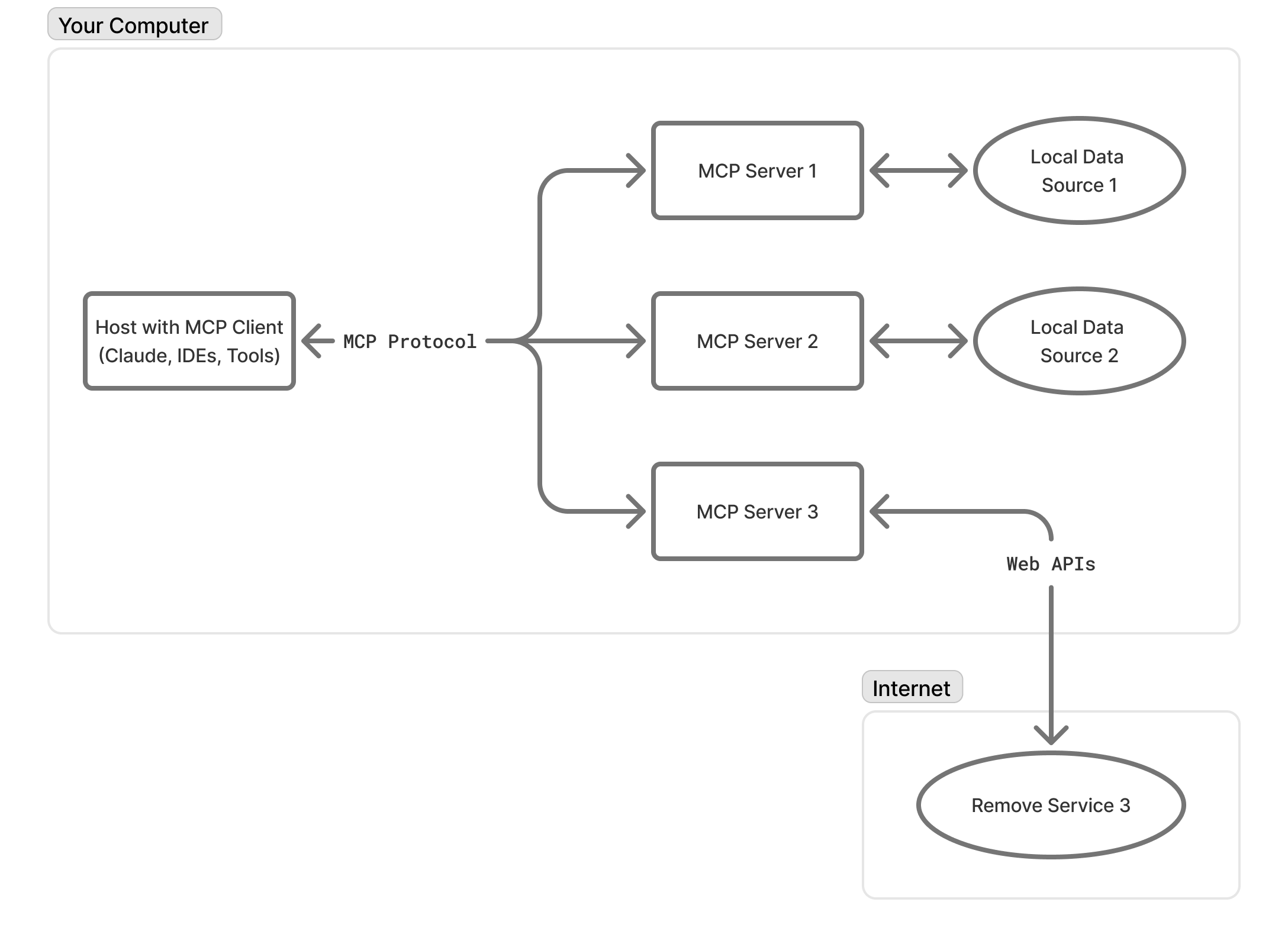
The first thing most companies ship is an MCP server that maps tool calls to REST endpoints. Claude or ChatGPT call the tools, the product receives the writes. The integration is correct. The outcome is inconsistent.

Adding a contact met at a conference to your CRM over MCP. Orchestration is solid, the records are unusable. Placeholder company name, free-text notes stuffed into structured fields, no link between person and company. The model hands back a five-item cleanup list and pushes the hard parts back to the user. The user opens the UI to fix it and blames the product, not the client.

The fix everyone reaches for is shipping context alongside the tools. Passive context loaded at session start, on-demand skills the model pulls in when relevant, live retrieval for changing data. Tell the model how the software works and how the org uses it. Cleanup list shrinks. Quality goes up. This is where most teams are right now in April 2026, and it's also where learning starts to compound.

It works. Until it doesn't.

---

## Wave 2: Context Engineering Hits a Ceiling

Wave 1's answer to inconsistent quality was ship better context. The problem is that context isn't storage, it's an attention budget. Every token loaded displaces another. And the thing managing that budget on every turn isn't your product. It's the harness, the layer around the model that decides what enters context, what stays, what gets summarized, what gets dropped. Whoever owns the harness owns the experience. Once you start taking this seriously, four things become hard to ignore.

- **Tool schemas eat the budget before work begins.** One MCP server is fine. Ten and the context window is a battlefield. Each ships its own naming conventions, semantics, behavioral notes, and the calling client holds all of them at once. Each one made the others slightly worse.
- **Long workflows quietly lose the plot.** Short tasks mask this. Multi-step ones expose it. As context fills up, the model gets worse at reasoning over it, the rule it followed perfectly at turn three gets diluted by turn twenty-five, and old tool outputs sit alongside fresh ones with no signal about what's stale. Coding agents that drift produce bad code. Product agents that drift produce business damage.
- **Short-term memory is the harness.** Within a session, what survives compaction, what gets summarized, what stays verbatim. The harness decides all of it. If your product's intelligence is composed by ChatGPT or Claude on the go, you don't get a vote.
- **Long-term memory is also the harness.** Across sessions, what the agent remembers about an account, a workflow, a recurring edge case. If the harness is closed, that memory is locked into someone else's platform. The agent might get smarter over time, but the smartness belongs to whoever's harness is doing the remembering.

And the whole thing is a black box. The product sees tool calls in and writes out. It doesn't see what the model reasoned over, where it started drifting, or why a decision produced bad data. When something breaks, you can see the broken record but not the state that produced it.

The industry has good answers to most of this. Dynamic tool loading instead of upfront schema dumps. Progressive disclosure that loads knowledge at the moment of relevance. Compaction to reclaim space. Sub-agents with fresh windows for subtasks. These are real advances and they buy real headroom.

But they're all engineering inside someone else's loop. You can ship the cleverest skills, the tightest schemas, the best AGENTS.md in your category, and you're still optimizing a system whose memory, context management, and observability live with the calling platform. Reasoning quality is rented. The data flywheel belongs to whoever owns the harness.

This is the wall.

---

## Wave 3: The Product Gets Its Own Brain

After enough engineering iterations, teams arrive at the same conclusion. Stop trying to make the external client smarter about your domain. Move the harness inside the product, and let the calling client be a transport layer that hands you intent and gets a quality response back.

The harness is everything that isn't the model. The system prompt, the tools the agent can reach for, what runs around each tool call, the environment the agent works in, what survives compaction, what gets remembered between sessions. When that lives in the calling client, you can't touch any of it. When it lives in your product, all of it is something a team can engineer, test, and improve.

Telemetry and reasoning traces are what unlock everything else. MCP-level telemetry tells you what tools were called and what data went in and out. A reasoning trace is the recording of how the agent got there. What it understood the request to be, what context it pulled in, which options it weighed, why it picked one and ignored the others, where it hesitated, where it corrected itself. The first is a security camera at the door. The second is the deliberation inside the room. Without traces, every other part of the harness is something you change and hope. With them, you can see which specific part failed and fix that part. This is what turns "we shipped an agent" into "we have a feedback loop."

Once you have that loop, four parts of the harness become things you can actually work on.

### The four parts you now own

<div className="my-8 grid grid-cols-1 gap-4 not-prose md:grid-cols-2">
  <div className="rounded-2xl bg-(--on-surface)/4 p-6">
    <div className="font-display text-lg">Tools, skills, prompts, and configuration</div>
    <div className="mt-3 text-sm text-(--on-surface-muted)">
      Which tools the agent can reach for, how they're described, when to load
      which capability, what runs before and after each call, how the agent
      recovers when something fails. Most agent quality issues you can identify
      in traces resolve here.
    </div>
  </div>

{' '}

<div className="rounded-2xl bg-(--on-surface)/4 p-6">
  <div className="font-display text-lg">Short-term memory</div>
  <div className="mt-3 text-sm text-(--on-surface-muted)">
    Within a session, what survives compaction, what gets summarized, what stays
    verbatim. If a long workflow keeps losing the rule it set in step three,
    traces show you the moment it dropped out and you can ship a fix.
  </div>
</div>

{' '}

<div className="rounded-2xl bg-(--on-surface)/4 p-6">
  <div className="font-display text-lg">Long-term memory</div>
  <div className="mt-3 text-sm text-(--on-surface-muted)">
    Across sessions, what the agent remembers about an account, a workflow, a
    recurring edge case. The signal from one interaction informs the next, and it
    stays with your product instead of with whichever client the user happened to
    invoke that day. This is also where lock-in flips.
  </div>
</div>

  <div className="rounded-2xl bg-(--on-surface)/4 p-6">
    <div className="font-display text-lg">Sandbox and environment</div>
    <div className="mt-3 text-sm text-(--on-surface-muted)">
      Where the agent's work actually happens. What tools are pre-installed, what
      the filesystem looks like, what the agent can and can't reach. Also a cost
      question that often gets ignored. Spinning up a full Linux VM for every
      session sounds safe until you do the math on a thousand concurrent users. A
      lot of agent work fits in a V8 isolate that starts in milliseconds. Some
      genuinely needs a container with a real shell. Almost nothing (except
      hardcore coding) needs a full VM. Owning the harness means picking the right
      environment for the task instead of paying for the heaviest option by
      default.
    </div>
  </div>
</div>

The result is an actual flywheel. Traces show you which workflows succeed, which inputs are ambiguous, where guardrails are needed. That signal feeds memory and informs the next change to the harness. The system around the model keeps getting better even when the model itself doesn't. Models get commoditized. Accumulated domain intelligence secures the edge.

---

## Building This Is Non-Trivial

The runtime is the easy part. The operational layer around it is where the real engineering lives. How agents start, recover, get configured, stay alive, isolate tenants, manage state across sessions. Most teams underestimate the surface area on the first attempt.

We'll get deeper into the agentic infrastructure challenge in upcoming posts. But for now, here's the list of frameworks, libraries and platforms we've been using or seen leading projects use as a starting point for their journey — each with its own pros and cons from a SaaS CTO/CEO perspective, which we'll cover more thoroughly soon.

<div className="my-8 grid grid-cols-2 gap-3 not-prose sm:grid-cols-3 lg:grid-cols-5">
  <a
    href="https://adk.dev/"
    className="rounded-2xl bg-(--on-surface)/4 p-5 font-display text-lg transition-colors hover:bg-(--on-surface)/8"
  >
    ADK
  </a>
  <a
    href="https://www.langchain.com/deep-agents"
    className="rounded-2xl bg-(--on-surface)/4 p-5 font-display text-lg transition-colors hover:bg-(--on-surface)/8"
  >
    Deep Agents
  </a>
  <a
    href="https://ai-sdk.dev/"
    className="rounded-2xl bg-(--on-surface)/4 p-5 font-display text-lg transition-colors hover:bg-(--on-surface)/8"
  >
    AI SDK
  </a>
  <a
    href="https://openai.github.io/openai-agents-js/"
    className="rounded-2xl bg-(--on-surface)/4 p-5 font-display text-lg transition-colors hover:bg-(--on-surface)/8"
  >
    Agent JS
  </a>
  <a
    href="https://agents.cloudflare.com/"
    className="rounded-2xl bg-(--on-surface)/4 p-5 font-display text-lg transition-colors hover:bg-(--on-surface)/8"
  >
    CloudFlare Agents
  </a>
</div>

---

## The Gap Widens Every Week

Category leaders didn't jump from MCP server to owned agentic system overnight. They shipped the integration, watched what users actually tried to do with it, learned where quality broke down, and built internal knowledge about what good agentic experience looks like for their domain. Then they built their own intelligence layer, informed by months of compounding learning.

A competitor starting today can copy the architecture. They can't copy what shaped it.

Every week your product is live in the agent ecosystem, you accumulate signal that feeds the next wave. Call patterns, failure modes, tool adoption curves, edge cases your documentation doesn't cover. You don't get this from a strategy deck. You get it from shipping and observing.

The companies that started in 2025 have a year of this data already. The gap widens every week.

Your board isn't asking whether AI matters anymore. Your competitors aren't debating whether to ship agent features. The question now is whether the intelligence lives in your product or in someone else's.

Ship the MCP server if you haven't already. Start learning. Start climbing. Time to #playoffense.

A few category leaders worth studying, if you haven't already:

<div className="my-8 grid grid-cols-2 gap-3 not-prose sm:grid-cols-3">
  <a
    href="https://agents.ramp.com/"
    target="_blank"
    rel="noreferrer nofollow"
    className="rounded-2xl bg-(--on-surface)/4 p-5 font-display text-lg transition-colors hover:bg-(--on-surface)/8"
  >
    Ramp — finance for the agent economy
  </a>
  <a
    href="https://www.notion.com/help/notion-agent"
    target="_blank"
    rel="noreferrer nofollow"
    className="rounded-2xl bg-(--on-surface)/4 p-5 font-display text-lg transition-colors hover:bg-(--on-surface)/8"
  >
    Notion Agent — a teammate that gets work done
  </a>
  <a
    href="https://linear.app/next"
    target="_blank"
    rel="noreferrer nofollow"
    className="rounded-2xl bg-(--on-surface)/4 p-5 font-display text-lg transition-colors hover:bg-(--on-surface)/8"
  >
    Linear — issue tracking is dead
  </a>
</div>

---

### McDonald's Magic Stories wins a Webby and Grand One

URL: https://www.intentface.com/stream/mcdonalds-magic-stories-grand-one-webby

Magic Stories, a generative storytelling experience we built for McDonald's, won two awards this spring: the **Webby People's Voice Award** and **Grand One**, Finland's largest digital industry competition, where it took Best Content Marketing.

## A story that builds with every visit

Magic Stories lives inside the Family Mode of the McDonald's app. Each visit becomes a new chapter in a personalized, animated story that casts the family as the heroes. Kids and parents create their own avatars, those avatars go on adventures, and the story reacts to the choices they make along the way, so no two families ever get the same tale and every visit unlocks the next one.

## Building an AI composer

The hard part was the technical implementation: balancing genuine AI creative capability against the safety guarantees a family brand requires. We built an AI composer that orchestrates multiple elements together, including language models, custom-trained image generation, the user-created avatars, and the story logic, into a single experience that produces a fresh, personalized, on-brand story every time, reliably and autonomously.

## Two awards, weeks apart

That combination of creative range and dependable safety is what landed the recognition. The Webby People's Voice Award is decided by public vote and Grand One by an industry jury, and within weeks of each other an international audience and a Finnish jury picked out the same project. You can see the work and the full credits on the [Webby winners page](https://winners.webbyawards.com/2026/advertising-media-pr/branded-content/food-beverage/373033/mcdonalds-magic-stories), the [Grand One entry](https://grandone.fi/kilpailutyo/?entry=mcdonald-s-magic-stories), and the [campaign case site](https://mcd-casesite.vercel.app/).

---

### What is Context Engineering

URL: https://www.intentface.com/stream/what-is-context-engineering

import TextCompletionDemo from "@/components/interactive/article/text-completion-demo";
import TokenPredictionDemo from "@/components/interactive/article/token-prediction-demo";
import StructuredCompletionDemo from "@/components/interactive/article/structured-completion-demo";
import ToolUseDemo from "@/components/interactive/article/tool-use-demo";
import RagDemo from "@/components/interactive/article/rag-demo";

Large language models are text completion engines at their core. They continue from whatever context you give them, predicting the most likely next tokens. Context is everything the model sees before it answers: system prompts, chat history, tool results, documents, UI metadata.

**Context engineering is designing everything the model sees before it generates a response.** In other words, effective AI implementations focus on building high-quality context that leads to high-quality outputs.

## Text in, text out

The first GPT models were simple text-in text-out systems. You gave them a text and the model generated a continuation of that text.

<TextCompletionDemo
  systemPrompt="You are a poet that creates short poems."
  userText="Write a poem about autumn."
  completedText="The leaves fall gently to the ground,
Painting the earth in hues profound.
The crisp air whispers through the trees,
A symphony of nature's ease."
/>

In the early days, people built clever prompt templates to guide the model's output. But fundamentally, you tried to build a chain of text that led the model to produce the desired result. This principle still holds true with modern LLMs.

LLMs are probabilistic text generators at their core that predict the next token based on the preceding context. It means each token or word you give as input or in system prompt can affect what comes next.

<span className="text-muted-foreground">
  Note: below is a simplified demo of how token prediction works. In real life
  tokens are pieces of words, punctuation, or spaces, but here we use whole
  words for clarity. [Watch this](https://www.youtube.com/watch?v=wjZofJX0v4M)
  for a more in-depth dive in transformers.
</span>

<TokenPredictionDemo
  examples={[
    {
      input: 'I love to eat',
      steps: [
        {
          predictions: [
            { token: 'pizza', probability: 0.28 },
            { token: 'chocolate', probability: 0.22 },
            { token: 'healthy', probability: 0.2 },
            { token: 'pasta', probability: 0.18 },
            { token: 'vegetables', probability: 0.12 },
          ],
          selected: 'pizza',
        },
        {
          predictions: [
            { token: 'with', probability: 0.35 },
            { token: 'and', probability: 0.25 },
            { token: 'for', probability: 0.2 },
            { token: 'on', probability: 0.12 },
            { token: 'at', probability: 0.08 },
          ],
          selected: 'with',
        },
        {
          predictions: [
            { token: 'friends', probability: 0.42 },
            { token: 'my', probability: 0.28 },
            { token: 'family', probability: 0.18 },
            { token: 'extra', probability: 0.07 },
            { token: 'cheese', probability: 0.05 },
          ],
          selected: 'friends',
        },
      ],
    },
    {
      input: 'I love to code',
      steps: [
        {
          predictions: [
            { token: 'in', probability: 0.35 },
            { token: 'Python', probability: 0.25 },
            { token: 'with', probability: 0.18 },
            { token: 'and', probability: 0.12 },
            { token: 'every', probability: 0.1 },
          ],
          selected: 'in',
        },
        {
          predictions: [
            { token: 'Python', probability: 0.38 },
            { token: 'JavaScript', probability: 0.22 },
            { token: 'TypeScript', probability: 0.18 },
            { token: 'React', probability: 0.12 },
            { token: 'my', probability: 0.1 },
          ],
          selected: 'Python',
        },
        {
          predictions: [
            { token: 'because', probability: 0.32 },
            { token: 'and', probability: 0.28 },
            { token: 'for', probability: 0.18 },
            { token: 'every', probability: 0.12 },
            { token: 'with', probability: 0.1 },
          ],
          selected: 'because',
        },
      ],
    },
    {
      input: 'I love to travel',
      steps: [
        {
          predictions: [
            { token: 'to', probability: 0.42 },
            { token: 'around', probability: 0.28 },
            { token: 'and', probability: 0.15 },
            { token: 'with', probability: 0.1 },
            { token: 'during', probability: 0.05 },
          ],
          selected: 'to',
        },
        {
          predictions: [
            { token: 'new', probability: 0.35 },
            { token: 'different', probability: 0.28 },
            { token: 'Europe', probability: 0.15 },
            { token: 'Asia', probability: 0.12 },
            { token: 'places', probability: 0.1 },
          ],
          selected: 'new',
        },
        {
          predictions: [
            { token: 'places', probability: 0.48 },
            { token: 'countries', probability: 0.32 },
            { token: 'cities', probability: 0.12 },
            { token: 'destinations', probability: 0.05 },
            { token: 'cultures', probability: 0.03 },
          ],
          selected: 'places',
        },
      ],
    },
  ]}
/>

## How chat models work

Most LLMs are trained to understand [chat templates](https://huggingface.co/docs/transformers/v4.57.1/chat_templating) that use system tokens like `<|system|>`, `<|user|>`, `<|assistant|>`, `<|tool|>`, `</s>`, which create better structure for multi-turn chats, tool use, reasoning etc.

The key point: under the hood it's still text-in text-out. We still want to build a chain of context that leads the model to produce the desired output.

<StructuredCompletionDemo
  messages={[
    {
      role: 'system',
      content: 'You are a helpful assistant that writes poetry.',
    },
    {
      role: 'user',
      content: 'Write a poem about autumn.',
    },
    {
      role: 'assistant',
      content:
        "The leaves fall gently to the ground,\nPainting the earth in hues profound.\nThe crisp air whispers through the trees,\nA symphony of nature's ease.",
    },
  ]}
/>

## Tools, MCP, and the application layer

Tool use (function calling) is the big shift that made LLMs far more useful beyond raw text generation. When an LLM uses tools like web search, code execution, APIs, it is not directly browsing the web or calling APIs.

Instead, the model generates text commands that the application layer interprets, executes and feeds back into the model as more context.

<div className="my-8 grid grid-cols-1 gap-2 not-prose md:grid-cols-4">
  <div className="relative p-4 rounded-lg bg-card flex max-lg:items-center lg:flex-col gap-4">
    <div className="w-8 h-8 shrink-0 rounded-full bg-foreground/50 text-background flex items-center justify-center text-sm font-bold">
      1
    </div>
    <div className="text-sm">
      The model generates a text command that matches a schema you define.
    </div> 
  </div>

{' '}

<div className="relative p-4 rounded-lg bg-card flex max-lg:items-center lg:flex-col gap-4">
  <div className="w-8 h-8 shrink-0 rounded-full bg-foreground/50 text-background flex items-center justify-center text-sm font-bold">
    2
  </div>
  <div className="text-sm">
    Your application parses that command, runs the real tool / API request.
  </div>
</div>

{' '}

<div className="relative p-4 rounded-lg bg-card flex max-lg:items-center lg:flex-col gap-4">
  <div className="w-8 h-8 shrink-0 rounded-full bg-foreground/50 text-background flex items-center justify-center text-sm font-bold">
    3
  </div>
  <div className="text-sm">
    You feed the result back into the model as more context.
  </div>
</div>

  <div className="relative p-4 rounded-lg bg-card max-lg:items-center flex lg:flex-col gap-4">
    <div className="w-8 h-8 shrink-0 rounded-full bg-foreground/50 text-background flex items-center justify-center text-sm font-bold">
      4
    </div>
    <div className="text-sm">
      The model continues the completion with this new information.
    </div> 
  </div>
</div>

**Tools**: These are structured definitions of what external capabilities the model can invoke. Each tool has a name, description, input schema, and output schema. An LLM might have multiple tools available, like "web_search", "get_current_temperature", or "execute_code" and choose which one to call based on the user's request.

**Application Layer**: This is the app where you call the LLM API, manage context, parse model outputs, execute tool calls, and handle the overall workflow. The application layer interprets the model's text commands, runs the actual tools or APIs, and feeds results back into the model. This is the part you are most likely building.

**Model Context Protocol (MCP)** turns application APIs into tool definitions. You can think of [MCP](https://modelcontextprotocol.io/docs/getting-started/intro) as the UI of apps for LLMs: instructions that let models reliably talk to external systems. For example a project management app might expose tools like "create_task", "list_tasks", and "update_task_status" with clear schemas the LLM can use. This is also how you build the upcoming [ChatGPT Apps](https://www.youtube.com/watch?v=2C4Cs6503gw) that let's ChatGPT use third party apps directly from the chat interface.

<ToolUseDemo
  messages={[
    {
      role: 'system',
      content: 'You are a helpful assistant with access to web search.',
    },
    {
      role: 'user',
      content: 'What is the weather in Helsinki today?',
    },
    {
      role: 'assistant',
      content: '{"tool": "web_search", "query": "weather Helsinki today"}',
    },
    {
      role: 'tool',
      content:
        '{"result": "Current weather in Helsinki: 2°C, light snow, wind 15 km/h"}',
    },
    {
      role: 'assistant',
      content:
        'The current weather in Helsinki is 2°C with light snow and winds at 15 km/h.',
    },
  ]}
/>

---

## So again, what is Context Engineering?

It's about assembling the right information, tools, and constraints at the right moment.
Every time the model runs, you're building a temporary workspace that includes:

- **System prompt**: role, rules, examples
- **User message**: the current request
- **Chat history**: recent conversation
- **Retrieved information**: relevant documents or data
- **Available tools**: what actions the model can take
- **Output format**: schemas guiding the response structure

> Building powerful and reliable AI Agents is becoming less about finding a magic prompt or model updates. It is about the engineering of context and providing the right information and tools, in the right format, at the right time. It's a cross-functional challenge that involves understanding your business use case, defining your outputs, and structuring all the necessary information so that an LLM can "accomplish the task."
>
> — [Phil Schmid / "The New Skill in AI is Not Prompting, It's Context Engineering"](https://www.philschmid.de/context-engineering)


Most AI failures aren't model failures. They're context failures. The model didn't have the right information, constraints, or tools available when it needed them.

**Context windows are limited.** It means the maximum number of tokens a model can process at once. Each time you send a message to a chat model, the entire context (system prompt, chat history, tool results, documents) is included and counts against that limit.

**Even large context windows suffer from "attention dilution"**, meaning that if you pack in too much information, the model loses focus. **Good context engineering means including only what's needed**, using compressed summaries over raw data, and retrieving information just-in-time rather than loading everything upfront.

## High-quality context leads into high-quality output

LLMs don't remember, don't learn on the fly, and don't run code by themselves. Every time you send data to an LLM, it's a fresh temporary workspace that requires all necessary information to be included in the context. Effective context engineering involves:

- **Selecting what goes into context**: Prompts, history, documents, tool results—everything the model needs to generate accurate responses.
- **Structuring it clearly**: Organize context so the model can follow the logic and produce coherent outputs.
- **Constraining outputs**: Use schemas and tools to guide the model toward producing reliable, structured results.

## On Retrieval Augmented Generation (RAG)

When you're working with large information sources like a knowledge base or documentation set, you can't include all the information in each request (because of the context window and well, costs). RAG initially became relevant to augment the model's original training data and to ground it's answers in this retrieved data.

Old RAG implementations retrieved context for every user query but these days most implementations are agentic: the model uses search as a tool and decides when it needs more information and what to search for.

<RagDemo />

The challenge is building an effective search system that finds relevant information across different query types. If your project relies heavily on knowledge retrieval, start by building a solid search infrastructure with AI agents as a primary consumer. AI agents can query data in multiple ways: keyword search, semantic search, filtered queries, or even executing code to compute results.

## AI implementations needs good user experience (UX)

**Consider a scenario:** you are using an AI assistant to get medical advice. The model provides an answer that seems plausible, but you have no idea where that information came from. Is it based on current medical guidelines, outdated information, or fabricated text?

Good AI UX builds trust through transparency and verifiability. LLMs can produce incorrect or misleading information even when functioning as intended, so design interfaces that help users verify outputs and recover from errors.

- **Be transparent**: show the process/context that lead to an answer.
- **Make it easy to verify citations**: ideally in-line, not just tiny footnote links that require reading a 20 page document.
- **Use friction wisely**: for example on critical actions, require user confirmation before execution.
- **Use streaming outputs** to let users see what is happening in real-time and being able to interrupt if something seems off.

Not everything needs to be a chat interface either. There are much to be explored in terms of intentfaces and different patterns of interaction that suit different use cases better than chat.

---

## How to build intuition about LLMs and context engineering

Getting hands-on experience is the best way to understand how LLMs work and how to design effective context. Here are some steps to get started:

- **Learn the basics**: Understand what structured outputs and tool calling are. They're the backbone of robust AI products.
  - If you have any development skills, you can try our basic [tool calling template](https://github.com/Intentface/tool-calling-template) to build a chatbot using [Vercel AI SDK](https://ai-sdk.dev). It's very bare bones but shows the core principles. We use it as an assignment in our recruitment process.
- **Learn context engineering**: Learn how to shape prompts, chain tools, and design flows that produce stable results. Start from guides like [Anthropic's context engineering article](https://www.anthropic.com/engineering/effective-context-engineering-for-ai-agents) or [OpenAI's prompt engineering guide](https://platform.openai.com/docs/guides/prompt-engineering). There's also [Google's prompt engineering guide](https://cloud.google.com/discover/what-is-prompt-engineering).
  - Nothing beats direct experience, so apply prompt engineering techniques in real projects.
  - You can also use LLMs to help you learn prompt engineering. For example, ask an LLM to critique and improve your prompts.
- **Try as many different GenAI products as you can**: Spot patterns in how they structure context and workflows. Direct experience builds intuition.
  - Try different chat apps like [ChatGPT](https://chat.openai.com/), [Claude](https://claude.ai/) and [Gemini](https://gemini.google.com/). Try to solve something for yourself and see how they manage web search, memory, deep research, and tool use in general.
  - AI app builders like [Lovable](https://lovable.dev/), [V0](https://v0.dev/), [Figma Make](https://www.figma.com/make/).
  - If you are code-curious or already have development chops: look at [Github Copilot](https://github.com/features/copilot), [Claude Code](https://www.claude.com/product/claude-code) and [ChatGPT Codex](https://chatgpt.com/codex).

For more in-depth LLM insights see [Andrej Karpathy's lectures](https://youtube.com/@andrejkarpathy) or watch [3Blue1Brown's Transformers, the tech behind LLMs](https://youtu.be/wjZofJX0v4M). You don't need to understand all the math behind LLMs, but having a mental model of how they work under the hood helps you design better context and prompts.

Over time you'll see that **everything is context building**: your prompt, the app's hidden prompts, the tools it calls, and the data you feed it. Use that understanding to form your own opinion, rather than echoing hype or skepticism. For more practical insights on building AI products, [Simon Willison's writing](https://simonwillison.net/) offers excellent real-world perspectives.

---

## To sum it up

**Context makes or breaks the AI implementations, and you only really understand how context works (prompts, structures, tools) by actually using and building with them.**

The gap between reading about AI and working with it directly is enormous. Theory gives you vocabulary, but practice gives you intuition about what works, what fails, and why. You also get a sense of different models' strengths and weaknesses, and how to design around those. So start experimenting today. Build small things. Break them. Fix them. Build for yourself. Solve a problem you have.

Build your own context.

---

### Agents, Workflows, and Tools: Navigating Through the Hype

URL: https://www.intentface.com/stream/agents-workflows-and-tools-navigating-through-the-hype

## The Core Distinction That Matters
> Workflows are recipes. Agents are chefs.

We think of workflows as deterministic, graph-based execution paths versus agents as goal-oriented systems with decision-making capabilities. But as you will see, the boundaries blur quickly.

Here's an analogy that might help: Think of workflows like a recipe and agents like a chef.

**A recipe (workflow) has:**
- Fixed steps in sequence
- Predictable outputs given the same inputs
- No decision-making beyond simple conditionals ("if dough is too dry, add water")
- Clear start and end points

**A chef (agent) has:**
- A goal ("make dinner for 6 people")
- Access to tools (knives, ovens, recipes)
- Ability to make decisions ("the market is out of salmon, I'll use chicken instead")
- Can invoke sub-tasks including following recipes

But here's where it gets interesting - and mirrors your observation about recursive complexity:
- Tools as Workflows: A chef might use a bread machine (a tool that executes a workflow). The chef decides when to use it, but the machine follows its program.
- Workflows with Agent Steps: A restaurant might have a workflow where "Step 3: Sous chef prepares sauce" - embedding an agent within a deterministic flow.
- Agents Using Agents: A head chef might delegate to sous chefs (other agents), who might delegate further.

The key insight is that these aren't really different categories but different levels of autonomy on a spectrum:

```mermaid
Fixed Script → Parameterized Workflow → Conditional Workflow → Goal-Directed Agent → Autonomous Agent
```

## Tool Calling: Where the Magic Actually Happens

Here's the key insight: **the agentic behavior you're seeing doesn't come from agent frameworks—it comes from the LLMs themselves.**

Modern LLMs like GPT, Claude, and Gemini have native tool-calling capabilities. When you see an "agent" that can search the web, analyze data, and write code, you're witnessing the LLM's inherent ability to reason about and orchestrate tool usage.

**Automatic Tool Chaining**
The real magic happens when LLMs chain tools based on previous results. For "I need to book a flight to the cheapest European city with good weather next week," the LLM will:

1. Search cheapest European flights → Find Budapest, Prague, Lisbon
2. Check weather for each → Budapest (rainy), Prague (cloudy), Lisbon (sunny)
3. Focus on Lisbon based on weather
4. Search specific Lisbon flights
5. Present recommendation combining price and weather data

This is genuine agentic behavior: goal-oriented reasoning, dynamic planning, and adaptive execution. But it's the LLM's native capability, not framework innovation.

**What Frameworks Actually Provide**
Most "agent frameworks" essentially offer:

- Tool Integration: Simplified APIs for connecting business systems
- Conversation/State/History Management: Handling multi-turn interactions and context
- Error Handling: Managing failed operations and retries
- UI Components: Pre-built chat interfaces and dashboards

**The intelligence isn't in the framework—it's in the LLM's ability to reason about tool usage.** Understanding this has important implications for your build vs. buy decisions and vendor independence.

### Agents as Abstraction Layers
Ultimately, agents are abstraction layers that package LLM reasoning, tool orchestration, and workflow management into reusable components—valuable for operational consistency, but the core intelligence still comes from the underlying LLM.

### The Value of Prompt Transparency
Many frameworks provide a "black box" approach—you define roles, goals, and tools, but the actual prompts sent to the LLM are hidden. While this offers excellent prompt engineering out of the box, you lose transparency and it becomes difficult to reverse engineer what actually got sent to the model when debugging or optimizing performance.

For example, in OpenAI's Agents SDK and Google's ADK, the popular "handoff" feature that routes conversations between specialist agents is simply a tool call with built-in system prompts that you can figure out only by reading the code.

By treating prompts as first-class code (inspired by the [12-Factor](https://github.com/humanlayer/12-factor-agents) Agents methodology), we maintain full control over what's sent to the LLM and can optimize precisely for our specific use cases.

### Summary: Navigating Through the Hype
The AI industry is full of marketing buzzwords, but understanding the fundamentals helps you make better strategic decisions:

**The Reality Check:** Whether you call it an agent, workflow, or tool—the intelligence comes from the LLM itself. Modern LLMs like GPT-4 and Claude have native tool-calling capabilities that enable sophisticated, goal-oriented behavior without any framework magic.

**The Spectrum**: Rather than distinct categories, think of a spectrum from fixed scripts to autonomous agents. Most practical AI applications combine deterministic workflows with LLM decision-making at key points.

**The Trade-off**: Agent frameworks offer operational convenience but reduce transparency. The choice isn't whether frameworks are good or bad—it's whether their benefits outweigh the loss of control for your specific use case.

**The Strategic Insight**: Your competitive advantage doesn't come from the agent wrapper—it comes from your domain expertise, proprietary data, and the quality of your prompts and tools. The LLM provides the intelligence; everything else is implementation detail.

Understanding these fundamentals helps you evaluate vendors more effectively, make better build-vs-buy decisions, and avoid paying enterprise premiums for capabilities you could integrate directly.

---

### Thoughts on the Model Context Protocol Part 2

URL: https://www.intentface.com/stream/thoughts-on-the-model-context-protocol-part-2

{' '}


# Thoughts about MCP Part 2

Since Anthropic first open-sourced the Model Context Protocol (MCP) in late 2024, the community has raised concerns about its transport, security, metadata and adoption. The **2025-03-26 MCP spec update** addresses most of these—but real-world implementations and host support remain in flux. Below is a concise, critical rundown.

---

## 1. Adoption Is No Longer in Doubt

**Then:** Would OpenAI or Google ever back MCP?  
**Now:** OpenAI’s Agents SDK, ChatGPT Desktop and API support MCP[^1], and Google’s Claude team has signaled compatibility[^2].

> **Note:** It’s still hard to know exactly which host apps fully implement the new spec changes; we expect major clients to publish detailed support matrices soon.

---

## 2. Transport Is Cloud-Friendly

**Then:** MCP’s HTTP + SSE transport forced stateful, long-lived streams—hard to scale on serverless platforms.  
**Now:** A **Streamable HTTP** transport lets each request stand alone or upgrade to a short-lived stream, making MCP servers deployable as standard HTTP functions on AWS Lambda, Azure Functions, etc., without wrestling with SSE.

---

## 3. Built-In Security via OAuth 2.1

**Then:** No standard auth—each server rolled its own, risking inconsistent or weak security.  
**Now:** The spec mandates an **OAuth 2.1** flow for remote MCP servers, so users explicitly grant scopes and tokens before any tool call.

> **Reality check:** As of May 2025, few production implementations exist—how OAuth will look in practice will become clear once servers and host clients roll out support.  
> **Local stdio plugins** remain outside this flow, so they still rely on OS-level safeguards.

---

## 4. Tool Safety Metadata

**Then:** Tools lacked formal labels—no way to flag “read-only” vs. “destructive,” risking accidental data loss.  
**Now:** Every tool can declare metadata such as `readOnly` or `destructive` in its description (spec changelog PR [#185](https://github.com/microsoft/model-context-protocol/pull/185)). Hosts can warn users or agents before running high-impact actions.

---

## 5. Easier Setup & Deployment

**Then:** MCP servers were mainly local subprocesses; remote deployment was tricky.  
**Now:** Streamable HTTP plus official SDKs (Python, JavaScript, Java, .NET, Swift, etc.) and reference servers (e.g. Playwright) make both local and cloud-hosted MCP servers straightforward to launch. One-click demos on AWS Lambda abound.

---

**Bottom line:** The **2025-03-26 MCP spec** has plugged most major gaps—transport, auth, metadata and adoption are all moving forward. Remaining work lies in proper implementation: securing local plugins, enforcing user consent, polishing UIs and tracking which hosts support the new features. MCP’s rapid evolution and heavyweight backing suggest it might become a sound investment for AI-tool interoperability.

[^1]: https://x.com/OpenAIDevs/status/1904957755829481737
[^2]: https://x.com/sundarpichai/status/1910082615975313788

---

### Thoughts on the Model Context Protocol

URL: https://www.intentface.com/stream/thoughts-on-the-model-context-protocol

<img src="/stream/thoughts-on-the-model-context-protocol/mcp-chart.png" className="max-w-full w-full" alt="Model Context Protocol architecture: a Host AI application contains an MCP Client that holds a 1:1 connection to an MCP Server, which exposes tools, files, and data sources to the language model." />

## Key Concepts: Host, Server, and Client

MCP is built around three main concepts:

### Host

The Host is an AI application that has implemented support for the protocol. For example, Claude Desktop was the first to support MCP. In contrast, ChatGPT does not currently support MCP, though time will tell if they eventually adopt it or develop their own standard.

### Server

The Server is what developers build to expose tools, files, or other capabilities for use by large language models (LLMs). If you’re developing custom features, you’re typically creating an MCP Server for existing applications to leverage.

### Client

The Client is the 1:1 connection with the server. Essentially, this is the component implemented by host applications (like those from Anthropic) that manages the dedicated connection to an MCP Server.

In most cases, unless you’re building your own chat client, you’re focused on developing custom MCP Servers for integration with existing hosts.

## MCP Server Overview

MCP provides SDKs for Python, TypeScript, Java, and Kotlin, making it straightforward to add custom capabilities. There are three main types of capabilities:

- Resources: Files or data that clients can read.
- Tools: Functions that can be called by LLMs.
- Prompts: Pre-written templates that help users accomplish specific tasks.

If you’re already familiar with LLM function calling, you’ll find that tool usage is quite intuitive.

Example: Adding a Weather Tool with the TypeScript SDK

Below is an example of how to add a custom weather tool using the TypeScript SDK:

```typescript

// Create an MCP server
const server = new McpServer({
  name: 'Demo',
  version: '1.0.0',
})

// Add a weather tool
server.tool(
  'get_weather',
  { city: z.string().describe('City you want the weather for') },
  async ({ city }) => {
    const res = await fetch(`https://some-weather-api.com/${city}`)
    const data = await res.json()
    return {
      content: [{ type: 'text', text: data.forecast }],
    }
  },
)

// Start receiving messages on stdin and sending messages on stdout
const transport = new StdioServerTransport()
await server.connect(transport)
```

For more details on resources and prompt templates, check out the Resources Documentation and the Prompts Documentation.

## How Does MCP Differ from Function Calling?

At first glance, you might wonder why MCP is needed when you can simply use function calling and prompt injection to add files or data to an LLM’s context. The key difference is that MCP is designed to integrate third-party capabilities into existing AI applications. If you’re building your own chat interface, you can handle context and function calling yourself, retaining full control.

However, if your application grows and users begin requesting additional features, supporting MCP allows third-party developers to add new functionalities to your application. For instance, imagine if Claude could seamlessly integrate your tools—for fetching sports scores or nearby bus schedules—without requiring you to build a new chat interface from scratch. That’s where an MCP Server comes in.

## Concerns and Areas for Improvement

There are a few points that could be improved:

### UI Control over Tool Calls

When you add custom tools to your MCP Server, you have no control over how tool calls are rendered in the host application’s UI. The host will display the tool calls in its own predetermined style.

### User Prompts for Tool Execution

Most applications prompt the user for permission before executing a tool. While this is a good safety measure, it would be beneficial if the MCP allowed you to specify the operation type:

- Read Operations: These could run automatically.
- Mutating Operations: These should continue to prompt the user for confirmation.

### Uncertain Future of the Standard

Since MCP is still new, it remains to be seen whether it will become the de facto standard. There’s also the possibility that other major players like OpenAI may develop their own protocols, leading to a fragmented ecosystem.

### Ease of Use and Deployment

Currently, installing MCP Servers on a host application isn’t very user-friendly for non-technical users. While this may improve in the future, it remains a barrier to adoption. Moreover, most MCP Servers are local at the moment, though development is underway to support remote MCP Servers.

### Statefulness Challenges and Compatibility Issues

The Model Context Protocol (MCP) has been critiqued for its reliance on stateful, long-lived connections between clients and servers. This design supports features like bidirectional notifications and server-initiated actions but poses challenges for serverless environments that favor short-lived, stateless interactions. Such environments often auto-scale and limit request durations, making MCP's statefulness less compatible with modern deployment practices.

Update: But this might change in near future, a [RFC](https://github.com/modelcontextprotocol/specification/discussions/102) (request for comments) was made that suggests that the HTTP+SSE transport should be replaced with “Streamable HTTP” transport. This would make it easier to host MCP servers in serverless enviroments due to its stateless nature.

### Lack of Built-in Authentication and Security Concerns

Additionally, MCP currently lacks built-in authentication and authorization mechanisms, leaving these responsibilities to individual implementations. This omission can lead to inconsistent security practices and complicate the integration process, as developers must devise custom solutions to safeguard interactions between clients and servers.

## What does this mean for SaaS-companies

If your SaaS provides valuable data or functionality that AI assistants or external tools might need, you should consider hosting an MCP server to expose controlled access. If your SaaS includes built-in AI features that require contextual data from external sources (e.g., pulling documents, CRM records, or logs), you should implement an MCP client to fetch that information.

You should build an MCP server when your product is a data source or a tool provider (e.g., project management platforms, databases, or ticketing systems) and external AI agents need structured access to your data. Conversely, use MCP client support if your SaaS product consumes external context (e.g., an AI-powered dashboard pulling insights from connected services). For AI-heavy SaaS products, both a host and client approach might be necessary—allowing bidirectional interactions where your AI features can both retrieve and serve data dynamically.

## Useful links

- [Model Context Protocol Documentation](https://modelcontextprotocol.io/introduction)
- [Awesome MCP Servers](https://github.com/punkpeye/awesome-mcp-servers)
- [Awesome MCP Clients](https://github.com/punkpeye/awesome-mcp-clients/)

---

### Synthetic Data in 2025: Revolutionizing GenAI Model Performance

URL: https://www.intentface.com/stream/synthetic-data-in-2025-revolutionizing-genai-model-performance

## Introduction

Synthetic data generation has advanced significantly, with larger language models now being leveraged for knowledge distillation to produce high-quality training examples. It enables the creation of domain-specific datasets that can be used to finetune smaller or specialised models while preserving accuracy, lowering computational costs, and reducing existing data requirements.

For instance, this approach enables efficient finetuning of GPT-4o, Llama etc. for specific use cases with just a few synthetic examples, or training specialized ModernBERT models for classification tasks within your agentic workflow \- achieving better performance on downstream tasks while requiring only a fraction of the computing resources. This is particularly valuable for high-throughput, latency-sensitive applications like LLM routing or real-time classification tasks, especially in agentic workflows where multiple models are used in sequence \- each round of model inference compounds the efficiency benefits and reduces overall latency.

---

 <div className="mb-12">
    ## Early Days of Data Generation Practices: Naive LLM API Querying

    <div className="space-y-10 pl-6 border-l-2 my-2">
      <div className="relative">
        <div className="absolute w-4 h-4 bg-border rounded-full -left-8 top-2"></div>
        <div className="ml-4">
        ### Model Collapse

        Generated samples often lacked diversity, with models falling into repetitive patterns even when prompted differently. This similarity between samples limited the training value of the synthetic datasets.
      </div>


    <div className="relative">
        <div className="absolute w-4 h-4 bg-border rounded-full -left-8 top-2"></div>
        <div className="ml-4">
        ### Structured Output Issues

        Without proper constraints, output formatting was inconsistent across samples, making dataset integration difficult. What worked in one generation would fail in another, creating a constant need for format verification and correction.
      </div>
    </div>

    <div className="relative">
      <div className="absolute w-4 h-4 bg-border rounded-full -left-8 top-2"></div>
      <div className="ml-4">
        ### Reliability Problems

        Large-scale generation jobs were particularly vulnerable to:

        - API timeouts and rate limiting
        - Network connection interruptions
        - Inconsistent response formats
        - Incomplete generations

        These issues often meant paying multiple times for the same data as jobs failed mid-way through hundreds of generations.
      </div>
    </div>

</div>
  </div>
</div>

---

 <div className="mb-12">
    ## The Path to Maturity: From Quick Fixes to Robust Tools

    <div className="space-y-10 pl-6 border-l-2 my-8">
      <div className="relative">
        <div className="absolute w-4 h-4 bg-border rounded-full -left-8 top-2"></div>
        <div className="ml-4">
          ### Custom Scripts Evolution

          Teams developed increasingly sophisticated solutions:

          - Caching mechanisms to prevent redundant API calls and preserve successful generations
          - Smart prompting systems that:
            - Track and avoid duplicate examples
            - Break down complex queries into manageable chunks
            - Enforce parameter ranges for greater control
            - Post-processing pipelines for consistent data cleaning and validation
        </div>
      </div>

      <div className="relative">
        <div className="absolute w-4 h-4 bg-border rounded-full -left-8 top-2"></div>
        <div className="ml-4">
          ### Emergence of Specialized Libraries

          Tools like Instructor ([python.useinstructor.com](http://python.useinstructor.com)) emerged to provide:

          - Structured data generation
          - Type validation
          - Automated error handling
          - Built-in best practices for synthetic data creation
        </div>
      </div>

      <div className="relative">
        <div className="absolute w-4 h-4 bg-border rounded-full -left-8 top-2"></div>
        <div className="ml-4">
          ### Modern Tooling Platforms

          Advanced platforms like [Curator](https://github.com/bespokelabsai/curator/) by Bespoke Labs & [Distilabel](https://distilabel.argilla.io/latest/) by Argilla now offer:

          - End-to-end data generation pipelines
          - Quality control mechanisms
          - Scalable infrastructure
          - Integrated monitoring and validation
        </div>
      </div>
    </div>

  </div>

---

## Building Synthetic Datasets: A Practical Example

We believe that intent recognition is a fundamental component of smart, AI-powered user experiences. That’s why we’re showcasing its potential through synthetic data generation. You can explore a minimal, straightforward example on [Google Colab](https://colab.research.google.com/drive/1xyWggGjK-qy9kdTvAA_4lVAr52uLKX5s?usp=sharing), which demonstrates how synthetic data can be generated for intent recognition.

Tools and libraries make things easier by obfuscating some parts of the execution, but at the same time, they may make it harder to understand what happens behind the scenes. For that reason, we wanted to create the simplest and cleanest example possible, making it accessible even to those with less experience in the synthetic data space.

### In a nutshell, in this code:

1. We install dependencies, [instructor](https://github.com/instructor-ai/instructor) for structured generation, openai to be used as a client for generation, and some other helpers
2. Define the intents or labels we want to create queries for
3. Use Pydantic class to define our output structure
4. Create generate_queries function which takes in intent (str) and outputs 20 queries for intent, also define generate_dataset function which takes list of intents and generates queries for each and outputs list of dicts which contains query, text and some metadata
5. We turn our raw generated dataset into Huggingface Dataset and push it to Huggingface

Output dataset can be found [here](https://huggingface.co/datasets/intentface/intent_recognition)

We challenge you to replicate this using [Curator](https://github.com/bespokelabsai/curator/) or [Distilabel](https://distilabel.argilla.io/latest/) and let us know which one you preferred and why.

---

## Looking Forward: The Promise of Small Language Models

**There seems to be a trend emerging: the shift toward smaller, more efficient and specialized models.** We believe the future lies in using LLM generated data to train smaller focused models that can be deployed efficiently at scale (or even locally).

**In our next article, we'll explore how organizations are successfully replacing large, general-purpose models with smaller, specialized ones trained on synthetic data.** We'll examine real-world cases where this approach has led to significant improvements in both performance and operational efficiency.

**Have you experimented with synthetic data or small language models in your work?** We'd love to hear about your experiences. Share your insights in the comments below or join our community discussion about the future of AI model development.

## Appendix: Can I Use Commercial Models for Synthetic Data?

In short, if you’re using a commercial LLM like Claude, be aware that while you generally own the text it generates, the Terms of Service often prohibit using that output to build a competing language model. Please consult your company's legal team to avoid potential pitfalls. It’s also worth considering an open-source LLM with a more permissive license that explicitly allows you to reuse outputs for training. It’s always better to play by the rules than to find yourself on the wrong side of a TOS.

---

## Further Reading

For a deeper dive into these topics, check out these excellent resources:

1. ["Fine-tune classifier with ModernBERT in 2025"](https://www.philschmid.de/fine-tune-modern-bert-in-2025) \- Comprehensive guide on utilizing ModernBERT for classification tasks
2. ["Finally, a replacement for BERT: Introducing ModernBERT"](https://simonwillison.net/2024/Dec/24/modernbert/) \- Simon Willison's detailed exploration of ModernBERT
3. ["Fine-tune ModernBERT for RAG with Synthetic Data"](https://huggingface.co/blog/sdiazlor/fine-tune-modernbert-for-rag-with-synthetic-data) \- HuggingFace guide on combining RAG and synthetic data
4. ["Synthetic data & Smol models in 2024"](https://docs.google.com/presentation/d/137gGyMRhoKQnKRbAWkkUcwwuJH9Gdwons9U6gv0X0is/edit#slide=id.p11) \- Comprehensive presentation on the evolution of synthetic data and small models
5. ["Synthetic Data Generation with Instructor"](https://python.useinstructor.com/tutorials/7-synthetic-data-generation/) \- Tutorial on using Instructor library for structured synthetic data generation
6. ["Distilabel: Advanced Data Generation Guide"](https://distilabel.argilla.io/latest/sections/how_to_guides/#advanced) \- Detailed guide on scalable data generation with Distilabel

---

### Founder Conversations: A Week of LLM Insights in the Bay Area

URL: https://www.intentface.com/stream/founder-conversations-llm-insights-bay-area

## Introduction

We spent a week talking to founders and builders at Ray Summit, TechCrunch Disrupt, and various Bay Area GenAI meetups to understand the challenges they face when building value-providing LLM-based apps.

---

## Overview

- **RAG is omnipresent.** Retrieval Augmented Generation is the current trend everyone is working on. While it addresses many challenges of deploying LLMs in production, it introduces several others. We'll delve deeper into these later in this post.
- **Fine-tuned smaller models are making an impact.** In certain use cases, a fine-tuned LLama 7B model can outperform GPT-4 at a fraction of the cost.
- The term **"orchestration" seems to be largely replacing "chaining."** As LLM apps become more intricate, orchestration is a challenge that development teams are grappling with.
- Another challenge is **evaluating LLM performance, or "evals"**, which involves determining if your chain/agent is producing accurate answers, or whether the changes you implement improve or degrade the system.
- The essence of **RAG-based system performance lies in chunking strategies** and the subsequent vectorization of data chunks. If the contextual data you retrieve to aid your LLM in answering questions is inaccurate or of poor quality, your LLM will not respond correctly.
- **If the retrieved context is correct, it works.** Open-source LLMs (like Llama 2 models) and Proprietary models (like GPT-3 and GPT-4 models) seem to perform almost equally well at forming answers.
- **Anyscale released reasonably cheap [endpoints](https://app.endpoints.anyscale.com/) for Llama models.** They will add fine-tuning endpoints later this year. Switching from OpenAI models is easy since the API is almost 1-to-1 match with OpenAI API.

---

## Ray Summit 2023 — Highlights

### John Schulman, Co-founder, OpenAI

_Ray Summit Day 1 Keynote_
[Watch the keynote](https://youtu.be/r-NYSeAXCko?t=1789)

Paraphrasing John regarding whether they were surprised by ChatGPT's success: "We were very surprised. We had friends and family using it for a few months beforehand. There were some enthusiastic users, particularly those using it for coding, but overall, the excitement was muted. Not all users kept returning to it. I believe that once it became widely accessible, users taught each other how to use it effectively. The social element was crucial."

&rarr; Sometimes testing with real users is not the whole truth, especially when it comes to new technology that might have use cases beyond the initial imagination.

### Goku Mohandas, ML & Product, Anyscale & Philipp Moritz, Co-founder and CTO, Anyscale

_Ray Summit Day 1 Keynote_
[Watch the keynote](https://youtu.be/r-NYSeAXCko?t=6287)

Discussing the development of a chat co-pilot for Ray documentation:

- The assistant employs a hybrid routing solution based on a fine-tuned LLama2-70B. However, it redirects some of the more intricate queries to OpenAI's GPT-4, merging cost efficiency with superior quality when required.
- To control or minimize hallucinations, they've implemented RAG and evaluations of queries. This in turn aids in routing queries between LLama2 and GPT-4.

### Albert Greenberg, VP of Engineering, Uber & Wei Kong, Engineering Management, Uber

_Ray Summit Day 2 Keynote_
[Watch the keynote](https://youtu.be/CwIvsmuGqk4?t=1067)

- Uber introduced an AI-powered coding assistant into their development tools, trained on their unique codebase, to enhance development speed and the user experience.
- Their AI-driven app testing tool, DragonCrawl, leverages generative AI to replace manual tests and improve app quality.
- Uber integrates both broad and task-specific LLMs in their AI toolkit.
- On Generative AI's impact, they noted: "GenerativeAI democratizes and benefits almost everyone in the company."
- They underscored Generative AI's primary roles in Creation, Summarization, Discovery, and Automation.

### M Waleed Kadous, Chief Scientist, Anyscale

_Open Source LLMs: Viable for Production or a Low-Quality Toy?_
[Read slides](https://www.slideshare.net/WaleedKadous/open-llms-viable-for-production-or-lowquality-toy)

- M Waleed Kadous of Anyscale discussed the distinctions between proprietary and open LLMs, their applications, and current gaps.
- Anyscale's RayAssistant uses both Llama 2 models and GPT-4, with fine-tuned Llama models directing requests to the most suitable model.
- Specialized fine-tuned models can outperform proprietary ones like GPT-3.5 or GPT-4.
- Solely using GPT-4 would have yearly costs of ~$35,000; smart use of open models reduces this to around $900 annually.
- Anyscale offers [endpoints](https://app.endpoints.anyscale.com/) for Llama 2 models at $1/M tokens and plans to release fine-tuning endpoints later this year.

---

## GenAI Collective Meetup — Highlights

We participated in the GenAI Collective meetup on September 18th in San Francisco. Werqwise co-working space was packed with people and the event was sold out. Meetup also had a few interesting product demos.

### Matt Huang, Knowbl & Ryan Reede, MovieBot

_Product demos_

- [Knowbl](https://knowbl.com), a platform that can process your knowledge base and then build on-site search, and agent assistant on top of it. Their copilot keeps the brand message in check by providing only pre-approved answers.
- [Moviebot](https://www.moviebot.io/), an application that lets you prompt a conversation between characters you have created with their editor, and then it uses a game engine to render a video from it.

### Sophie McNaught, Vouch Insurance

_Insuring GenAI Products_

- To drive the adoption of their genAI services, Microsoft and AWS already offer defense to users of their generative AI tools if they're sued for copyright infringement.
- However, there are many use cases that they don't cover.
- Insuring the inherent risks of using generative AI in products is emerging as an area of interest, and it's something founders should monitor closely.

---

### The HARG Truth: AI's Need for the Human Element

URL: https://www.intentface.com/stream/the-harg-truth-ais-need-to-human-element

## Introduction

In the evolving landscape of AI-powered systems, combining human intuition with machine efficiency can create robust and reliable solutions. The Human-Augmented Retrieval Generation (HARG) method builds upon the Retrieval Augmented Generation (RAG) model, integrating a crucial human touch to the pipeline.

To understand HARG, it's essential to first understand **how RAG operates:**

1. **Query:** For example, User asks a question
2. **Retrieval Step:** Question is parsed and relevant documents related to the question are retrieved
3. **Documents and original query:** Documents and the original prompt are fed to the language model
4. **Response:** Answer is generated based on the documents and original query

This is a distilled overview. Each step contains its own intricacies and nuances, but the basic framework is as outlined above.

While RAG boasts numerous promising applications, it sometimes falls short. There are instances where the retrieved documents might be similar to the query but not strictly relevant. For instance, if someone inquires about Manchester United's performance this season, and the system retrieves documents related to the seasons '74-'75, '78-'79, and '87-'88, the response would be imprecise. A human, upon reviewing, would likely notice this discrepancy and adjust the query accordingly (add the current year to it) or pick manually correct documents as context.

## Adding a human step

HARG is designed for knowledge-intensive tasks that not only rely on accurate retrieval of information but also human judgment to select the most appropriate context. Unlike RAG, which automatically concatenates retrieved documents as context, HARG proposes a step where a human reviews the suggestions made by the retrieval component. This ensures that the selected context is both relevant and appropriate, thereby further reducing the chances of “hallucination” or generation of incorrect or irrelevant information.

**Here’s how HARG operates:**

1. **Query:** For example, User asks a question
2. **Retrieval Step:** Just like RAG, HARG retrieves a set of relevant/supporting documents from a source (e.g., Wikipedia) based on the input.
3. **Human Selection Step:** Instead of automatically feeding the retrieved documents to the generator, a human expert reviews and selects the most pertinent context from the suggestions.
4. **Documents and original query:** Documents and the original prompt are fed to the language model
5. **Response:** Answer is generated based on the documents and original query

The inclusion of the human element in HARG serves a dual purpose: enhancing reliability by minimizing machine errors and ensuring the context aligns well with human intuition and understanding.

With the growing emphasis on human-in-the-loop AI systems, HARG bridges the best of both worlds, ensuring efficiency and relevance while maintaining the adaptability of retrieval-based generation models.

This HARG concept provides an additional layer of verification, ensuring more accurate and contextually appropriate responses.

## Optimal use-cases for HARG

HARG might not be the optimal solution for use cases where the user is purely searching for answers to questions. The user might not know which documents are relevant to the query. Prominent use cases for HARG lie in co-pilot-like applications, where the user is generating something, e.g., code or parts of legal documents. In these cases, the user usually has some knowledge of whether the retrieved documents are relevant and contain answers.

One use case would be a helper tool for a tech support operator. The operator might have a traditional chat UI where they have a conversation with users. While chatting with a user, a HARG-enabled agent might analyze the conversation, fetch relevant documents based on user information, questions, etc., and surface them on the UI for the Operator. The Operator, on the other hand, can pick and choose relevant documents and ask the Agent to generate possible answers to users' questions based on human-augmented context.

While doing this, all the generated question/answer pairs can be stored to later improve the agent itself, for example, by fine-tuning. The same logic would apply to numerous co-pilot-like applications.

---

### Intentface: Human-Centric Computing Through Intent-Driven Interactions

URL: https://www.intentface.com/stream/intentface-human-centric-computing

## Introduction

When you think about it, clicking dropdowns, filling input fields and browsing abstract representations of data feels kind of odd. It's not what we should spend our time learning and doing. These are all abstractions we've built out of necessity because computers haven't been able to translate our language and needs into actions. But that has now changed.

> Intentface as a word embodies our vision where technology understands us, not the other way around.

By leveraging advancements in natural language understanding, adaptive learning systems, and data contextuality, intentfaces can directly translate our spoken and unspoken needs into meaningful actions.

The essence of an intentface is to make technology more intuitive and user-centric by allowing users to express their needs most naturally—through language, context and actions.

We envision a future where technology is seamlessly integrated into our lives, becoming an invisible, user-friendly extension of ourselves. A future where we can focus on doing things that make us happier as humans instead of being glued to our screens.

## Examples of intentfaces

An intentface is a service that can be operated with natural language or contextual data, including your actions or voice. Early examples we've already implemented in our daily lives are services like ChatGPT, knowledge-base assistants, development co-pilots, image-, voice- and video-generation services where you can create content via prompts and voice-driven AI assistants like Siri and Alexa.

A common denominator for these is the ability to understand intent to a certain level and generate content or actions based on non-exact natural language. Instead of naming actions to do it, we can state the outcome we want.

## Change Will Not Happen Overnight

Traditional user interfaces will still overlap with intentfaces as a granular way to control software and apps. A fully screenless future is a compelling idea, but screens have their place, especially for tasks requiring focused attention, like viewing and browsing content and precision work.

AI assistants, co-pilots and chatbots are a great new way of interacting and navigating software and knowledge, but a chat-based user interface is not always the optimal solution. But when you start thinking software through intent-driven interactions, you can see many other ways of translating intent into actions.

While we can only partially eliminate traditional UIs, intentfaces can reduce the time we need to spend with them. An intentface-powered service can make it easier to start using any new service, understand new concepts and filter information for us more efficiently, among many other advantages.

## A significant change in human-computer interaction is happening

Phones with multitouch screens and faster mobile connections changed how we interact with technology by bringing a user interface to small devices, making it very convenient to use software on the go. This change also brought years of converting old software and building new mobile-native services. The paradigm shift didn't happen just because companies wanted to build mobile-driven services to use new technologies, but because the users started getting used to the convenience and demanded it.

We believe generative AI is enabling a similar significant paradigm shift with human-computer interaction, where companies need to start thinking about how they can build their generative AI native services and products to stay relevant. Again, it's not about the technology but the user experience and convenience it brings.

The revolution isn't only about making smarter technology but crafting technology that understands us better. And that's the future Intentface is building—one interaction at a time.

---

## Podcast — Building Agentic Experiences

### #8 Juho Eräste — Taito.ai Threw Away a Year of Work to Go Agent-Native

URL: https://www.intentface.com/podcast/08-juho-eraste-taito-ai

Juho Eräste, CTO of Taito.ai, on throwing away a year of work to rebuild their HR platform agent-native, switching to Claude, and why agents should control every part of a product.

Most SaaS teams add an agent to the product they already have. Juho Eräste and his co-founders threw away more than a year of work and rebuilt Taito.ai from scratch so the agent runs everything.

Juho watched Smartly grow from 10 to 1,000 people before co-founding Taito as a performance management tool. After roughly 18 months, long sales cycles pushed the team toward building a full HRIS. In late 2025 he spent about a month prototyping against three gates: historical data queries, a real-time UI everywhere, and field-level permissions for humans and agents alike. The team went all in on agentic coding, moved from OpenAI to Claude, and built a layer that can route to any model.

Today you can sign up, connect Claude over MCP, and never open Taito's web UI again. His take: the agent should be able to control every part of the tool, settings included.

---

### #7 Arto Tolonen — ProductSense Automates the Evidence, Not the Decision

URL: https://www.intentface.com/podcast/07-arto-tolonen-productsense

Arto Tolonen built ProductSense AI-native to fix product decision-making, then refused to let the AI make the decisions. It pulls transcripts, market signals and analytics into a knowledge graph where every insight is one click from the source, because in B2B product decisions are business decisions.

The incumbent product tools started adding AI on top of what they already had. Arto Tolonen spent a decade in product at Smartly.io — ending as CPO while the company scaled past $100M ARR — and saw what that looked like from the inside. ProductSense is his bet that building from the ground up, with AI at the core, produces a different product entirely: a knowledge graph that ingests sales and support transcripts, customer discussions, market signals and product analytics, then structures all of it for product decision-making.

The hard line he drew is that the system gathers the evidence, the human still makes the call. In B2B, product decisions are business decisions, and he does not think you should hand those to an AI anytime soon. Every insight traces back to the raw transcript so teams can audit the insight layer — and product marketing can borrow the customer's exact words.

## What we cover

- **AI as the centerpiece, not a layer.** Building from the ground up with AI at the core is a different product entirely from bolting it onto what already exists.
- **A knowledge graph of customer reality.** ProductSense ingests sales and support transcripts, customer discussions, market signals and product analytics, then structures all of it for product decision-making.
- **Nobody commits past three weeks.** Mid-sized companies with real customer bases now tell him they will not commit to anything further out than three weeks, because agentic engineering made building that fast.
- **The two kinds of product leader.** The hands-on builders are having the time of their lives. Arto's hunch is that there will be fewer roles for the ones who went into product mainly to become managers.
- **Evidence one click from the source.** Every insight traces back to the raw transcript, so teams can audit the insight layer, and product marketing can borrow the customer's exact words.
- **When your own pitch becomes the insight.** Their first analysis surfaced their own sales pitch as customer demand, which is why every prompt is now framed for product decisions instead of sales topics.
- **Scored signals, not vote counts.** Conversations get rated on whether the problem, the trigger and the frequency were actually understood, plus a confidence score and a read on where you are blind.
- **Why he refuses voting boards.** Votes only tell you who to talk to. An open submission board just floats the thing you should not build to the top of the list.
- **The decision stays human.** In B2B, product decisions are business decisions, and Arto does not think you should hand those to an AI anytime soon.
- **Back to UIs.** MCP adoption moved fast among technical product builders, but he expects interfaces to matter again, because natural language is a poor way to configure anything.

---

### #6 Santtu Koivumäki — Zero Bets Agents Will Break the CRM Lock-In

URL: https://www.intentface.com/podcast/06-santtu-koivumaki-zero

The CRM is the most defended category in B2B software. Santtu Koivumäki inherited all of its expectations and none of its code, then named the company after the number of clicks he wants left.

The CRM is the oldest category in SaaS, and its incumbents are still deciding where to inject AI into systems built over decades. Santtu Koivumäki and his co-founder Tuomo left Smartly.io in 2022, after scaling it past $100M ARR onto a go-to-market stack that had grown from Trello to Pipedrive to HubSpot to Salesforce and ended at 15 or more tools with every team in its own silo. Thirteen months after ChatGPT launched, they flew to San Francisco with no network there and started cold DMing founders on LinkedIn. One of them said over coffee that he would build a zero-click CRM, and the name stuck.

Two years in, Zero's API and MCP do nearly everything the UI does, and its best-fit customers come from HubSpot. Santtu's bet is that the switching-cost moat falls once agents can read a legacy CRM's configuration and rebuild it elsewhere. The data migration is the easy part.

## What we cover

- **Inheriting expectations, not code.** Zero has to meet everything buyers expect from a legacy CRM while carrying none of the decades of code that shaped those expectations — and why that asymmetry is the whole opportunity.
- **Where the name came from.** A cold LinkedIn DM to a Silicon Valley founder, a San Francisco cafe, and a stranger telling them to build a zero-click CRM.
- **API first by design.** Zero built its API through the front end before release, so the API and MCP now cover nearly everything a human can do in the interface. What that costs, and what it unlocks.
- **Junior, slightly stupid, very capable.** Santtu's working definition of an agent, and the guardrails, tools, context, and permissions it needs to be useful.
- **Sequencing autonomy by impact radius.** Internal and reversible actions run free. External actions get reviewed like the first 50 emails from a sales trainee.
- **The production incident.** A new user's agent misconfiguration moved every opportunity to one stage and associated them all with a single company. How it surfaced in a shared Slack channel and got rolled back.
- **Why the lock-in breaks.** Legacy CRM moats rest on switching cost. Agents can read data, permissions, and configuration and replicate it elsewhere — and configuration was always the hard part, not the data.
- **Build for one persona.** Build for everyone and you build nothing for anyone. Plus what Santtu runs himself: five agents on an old laptop with Telegram alerts, Codex for coding, and a self-built iOS gym coach that roasts him for missed workouts.

---

### #5 Joni Juup — Intentface's Build-First Method

URL: https://www.intentface.com/podcast/05-joni-juup-intentface

For one episode the show flips and the usual interviewer takes the guest chair. Joni Juup has helped a long list of SaaS companies build agentic experiences, so he has seen the same problems surface again and again. He shares his build-first method — picture the best possible outcome first, then walk back the steps — and why you should focus on the problem, not the technology.

For one episode, the show flips. Normally Joni Juup is in the other chair asking the hard UX questions — this time he's the guest, and Tapio Haaja does the interviewing. The reason is simple: Joni has helped build agentic experiences for a long list of SaaS companies, so he's seen the same problems show up again and again across very different products. What actually works, what keeps breaking, and what the safe bets are right now.

A designer and developer by craft, Joni was chaining language models together in a drag-and-drop playground before ChatGPT existed, demoing it at Web Summit in 2022 roughly two months before the launch that changed everything. He worked on machine-learning solutions at Silo AI before co-founding Intentface, and now comes in as an AI development partner to companies like Vainu, Agileday, and Jobilla — a catalyst who ships the first working proof-of-concept fast enough that something clicks.

## What we cover

- **The build-first method.** Picture the best possible outcome first, then walk back the steps to build it — and keep the technology and its restrictions out of the conversation until you know what "best" looks like.
- **Focus on the problem, not the technology.** When you're a hammer, everything's a nail. The teams that win start from the use case, not the model.
- **Intentface as catalyst.** How Joni comes into companies like Vainu, Agileday, and Jobilla to ship the first working proof-of-concept fast — the moment something clicks and the team is off to the races.
- **Hands-on or nothing.** Why you can't lead an AI transformation you're not doing yourself, and why prompting only comes from failing a lot.
- **Enterprise adoption, from the inside.** Lessons from Tapio's Sanoma years — give licenses to everyone, pick AI champions, and bring in peer examples from people's own vertical.
- **The thinning middle.** Code production used to be the bottleneck; now it isn't, and the hard part is deciding what to build — plus a low-tech life hack for thinking it through.
- **Roles are changing.** Why 10x engineers become 100x, what happens to junior positions, and the case for high-agency generalists over job titles.

---

### #4 Jaakko Hartikainen — No Waiting for Better Models

URL: https://www.intentface.com/podcast/04-jaakko-hartikainen-agileday

Jaakko Hartikainen built Agileday AI-native from its 2022 founding, then raised €6.4M on the bet that the models are already good enough and execution is the only thing left. He shares how he rebuilt company strategy in a week with agents iterating overnight, why legacy PSA incumbents are losing competitive evaluations, and how AI is breaking the time-and-materials business model.

The PSA software market is full of legacy platforms bolting AI onto decade-old code. Jaakko Hartikainen built Agileday AI-native from its 2022 founding, then raised €6.4M on the bet that the models are already good enough and execution is the only thing left.

Agileday started as a people-centric alternative to legacy ERPs for consulting firms. When generative AI arrived, Jaakko didn't retrofit — he accelerated. Today the product runs more than 10 agents, including one that reads an RFP and builds an optimal team in 60 seconds, and the company is winning competitive evaluations against global incumbents where AI is the deciding factor.

## What we cover

- **The internal AI transformation.** How Agileday reshaped its entire company strategy in a single week, iterating daily with a dedicated coder and agents running overnight, reviewed at 7am.
- **Automating operations.** Why MCP servers and autonomous agents are becoming a necessity, letting consultants respond to RFPs and build optimal teams in 60 seconds instead of hours.
- **Disrupting legacy giants.** Why incumbents weighed down by technical debt can't move fast enough, and how being AI-native from the data structure up wins evaluations.
- **The end of time-and-materials.** How AI is pushing consulting away from hourly billing toward outcome-based, fixed-price work.
- **An intelligence layer.** The vision for closed context loops, where the company's codified knowledge feeds the work and the executed work updates the context.

---

### #3 Henri Nordström — Betting the Company on Agents

URL: https://www.intentface.com/podcast/03-henri-nordstrom-jobilla

What started as a tech-enabled digital headhunting service is now a true SaaS platform powered by agents. Henri shares how Jobilla transitioned to an AI-first company during a tough market, why 75% of their code is now written by AI, and why he stepped down as CEO to focus entirely on the product's vision.

Jobilla hit a wall in 2023. Henri Nordström bet the entire company on AI and shipped an AI recruiter that revived their hyper-growth — customers went from 42 at year-end to 360 by April.

What started as a tech-enabled digital headhunting service is now a true SaaS platform powered by agents. Henri shares how Jobilla transitioned to an AI-first company during a tough market, why 75% of their code is now written by AI, and why he stepped down as CEO to focus entirely on the product's vision.

## What we cover

- **The tipping point.** How the tight market of 2022 forced Jobilla to abandon their existing software and invest millions into a brand new, AI-driven platform.
- **Codifying best practices.** How Jobilla trained their AI Recruiter on data from over 40,000 manual campaigns to automate candidate sourcing and targeted Meta advertising.
- **Human vs. machine.** The philosophy of "never send a human to do a machine's job," and why AI writing 75% of the codebase makes human software architects more valuable than ever.
- **From CEO to CPO.** Why Henri handed over the CEO reins to focus entirely on the AI transformation, taking a page from Steve Jobs's approach to visionary design.
- **The future of hiring.** Why the entire recruitment screening process should be automated, leaving humans to do what they do best: making the final call on the top few candidates.

---

### #2 Mikko Honkanen — When Your Users Are Agents, Not People

URL: https://www.intentface.com/podcast/02-mikko-honkanen-vainu

Mikko co-founded Vainu in 2014, bootstrapped it past 15M ARR, and built a proprietary data engine covering 50 million pages of Nordic business documents. Now he's watching the product shift from humans browsing a UI to agents pulling data through APIs and MCPs — the interface disappears, and the companies that move first with enterprises win.

What started as a bootstrapped sales prospecting tool has become a platform that ships AI agents digging through millions of pages of public filings for hidden buying signals. Mikko shares how Vainu got there, why Model Context Protocols changed his thinking on product, and what happens to B2B sales when the customer is an agent, not a person.

## What we cover

- **Bootstrapping a data giant.** The early days of Vainu — selling the first customers on nothing but Keynote slides, six months without a salary.
- **The AI aha moment.** How connecting proprietary databases to LLMs (and the arrival of MCP) shifted Mikko's view of what a product is.
- **A warning for founders.** Why executives, board members, and founders can't outsource AI to a committee — they have to get their hands on it themselves.
- **Vainu's agent family.** A look at the Research, Enrichment, and Discovery agents, and how they process 50M+ pages of public data.
- **Does SaaS survive AI?** Whether traditional SaaS moats hold up, and why proprietary data processing is becoming the durable competitive advantage.
- **From pull to push.** How interfaces are moving away from manual list-building toward systems that analyze behavior and surface the right leads automatically.
- **When agents become the buyers.** The frontier of B2B sales — what happens to trust-building when the initial screening is done by an AI agent on the prospect's side.

---

### #1 Tuomas Rinta — Building AI Agents for the Other 99%

URL: https://www.intentface.com/podcast/01-tuomas-rinta-luo

Tuomas spent over a decade in Silicon Valley tech leadership at Unity and Handshake. Now, with Luo, he's building an AI agent platform for knowledge workers who've never written a line of code. His take — the real bottleneck isn't the models, it's the experience.

Most AI discourse is built for engineers and power users. Tuomas Rinta is on a mission to bring agentic experiences to the other 99% — the everyday knowledge workers who see the hype but don't know where to start.

In this episode, Tuomas walks through Luo's philosophy on accessible AI: removing the empty-page problem, building trust through guardrails, and treating autonomous agents as an extension of your own workforce rather than a replacement for it.

## What we cover

- **From assistants to agents.** The critical transition in AI: moving from models that answer questions to agents that actually do the work without constant intervention.
- **Laziness as a virtue.** A 90s programming book that shaped Tuomas's philosophy: AI gives everyone the power to be lazy by automating the repetitive stuff and unlocking time for higher-value work.
- **Why agents need personas.** The psychology behind giving agents names and personalities (like Luo's sales agent, Roy Batty) — and how it makes a new technology feel natural.
- **The empty-page problem.** Why non-engineers struggle to build agents, and how Luo flips the script by having the AI interview the user to gather requirements and establish workflows.
- **Tool guards and the handbrake.** Tuomas's approach to safety: default-block, with human verification required for critical actions.
- **Hours worked by AI.** A new productivity metric for the era — stop measuring personal hours logged, start measuring the hours your agents work for you while you're away from the keyboard.

---

## Team

### CTO, Founder

URL: https://www.intentface.com/team/valtteri-karesto

Valtteri leads engineering at Intentface. He works on the systems side of agentic products — orchestration, retrieval, evals — and writes the bulk of the technical articles on intentface.com. Before Intentface he spent a decade shipping data and ML infrastructure in startups.

---

### CDO, Founder

URL: https://www.intentface.com/team/joni-juup

Joni runs design at Intentface. He's spent the last decade shaping product experiences in SaaS — first at Kollaprompt and adjacent startups, now applying the same craft to agentic interfaces. He writes here about human-centric computing and the interaction conventions LLMs need.

---

### Founder, Partnerships

URL: https://www.intentface.com/team/tuomas-vuori

Tuomas leads partnerships at Intentface — Salesforce, Google Cloud, and the broader ecosystem of platform and infrastructure relationships that shape how we ship to enterprise clients. He owns the conversations that turn a pilot into a programme.


{/* TODO needs Joni input — final bio copy */}

---

### Founding Investor & Advisor

URL: https://www.intentface.com/team/ville-tapani

Ville is a founding investor and advisor at Intentface. A Finnish technology entrepreneur and venture builder, he has founded and scaled multiple technology companies, and operates startups across industries through Nordic Venture Family, where he is founder and chairman. He brings a builder's view of what it takes to turn an early product bet into a company that lasts.

---

### CEO, Founder

URL: https://www.intentface.com/team/klaus-dahlen

Klaus is CEO and a founding engineer at Intentface. He sets the company's direction and stays close to the engineering — building, prototyping, and shipping alongside the team. Background in applied generative AI, with a long tail of full-stack work before that.

---

### Founder, GenAI Engineer

URL: https://www.intentface.com/team/lauri-junkkari

Lauri is a founding engineer at Intentface. He builds the core of our agentic implementations — model routing, tool use, custom retrieval pipelines — and partners closely with clients on the path from prototype to production. Background in full-stack engineering and applied machine learning.

---

### Chief Commercial Officer

URL: https://www.intentface.com/team/tapio-haaja

Tapio leads commercial at Intentface. He runs the conversations that take a generative-AI idea from a sketch on a whiteboard to a signed engagement, and stays involved through delivery to make sure what we ship matches what we sold.


{/* TODO needs Joni input — final bio copy */}

---

### GenAI Engineer

URL: https://www.intentface.com/team/aleksi-raatala

Aleksi is a GenAI engineer at Intentface. He ships the agentic features behind our client work — retrieval pipelines, evals, tool integrations — and treats every prototype as a chance to push the production envelope a little further.

---

### Design Engineer

URL: https://www.intentface.com/team/rasmus-viloma

Rasmus is a design engineer at Intentface — the kind who lives in the gap between a Figma file and a production component. He builds the interactive surfaces of our marketing site and client deliverables, and treats the demo as a first-class part of the design.

---

### GenAI Engineer

URL: https://www.intentface.com/team/joonatan-vanhala

Joonatan is a GenAI engineer at Intentface. He builds the agent loops, evals, and integration plumbing that turn client prototypes into production systems — and treats every shipped feature as a chance to tighten the gap between prompt and product.

---

## Partnerships

### Salesforce

URL: https://www.intentface.com/partnerships/salesforce

## What is Agentforce

Agentforce is Salesforce's AI agent platform. Unlike traditional chatbots, Agentforce agents can reason through complex tasks, take proactive actions, and adapt to new information mid-conversation. The Atlas Reasoning Engine lets them break down requests, plan multi-step work, and execute across systems with minimal human intervention.

## What we do together

Salesforce's Agent Builder makes simple agents easy. Shipping agentive solutions that move the business — and survive contact with production data — is a different skill. Intentface brings practical generative-AI experience from production engagements across healthcare, recruitment, B2B data, and PSA, focused on solutions that deliver measurable impact rather than technology theatre.

## How it works

Our standard engagement runs four phases. Each is short enough to commit to and concrete enough to evaluate.

### 1. Direction

A focused engagement to identify high-impact use cases, assess available data, and define success metrics for your Agentforce implementation. See [how we work](/services) for the full shape.

### 2. Rapid prototyping

Either a sandbox proof-of-concept or a build directly on your Salesforce data, depending on the risk profile. The goal is to validate the approach with the smallest credible artifact.

### 3. Solution development

Once the concept holds up, we develop a production-ready solution — appropriate integrations, real-world data handling, and the user experience considerations that determine whether it gets adopted.

### 4. Deployment and optimization

We support rollout, monitor performance, and iterate based on the feedback that only real users produce.

## Why this partnership

We've specialized in generative AI since the earliest GPT models. That gives us a different point of view from typical Salesforce implementation partners — we bring full-stack capability from backend integrations to AI UX, and we apply it to the use cases where Agentforce actually pays off, not the ones that look good in a demo.

[Get in touch](/contact) to explore how Agentforce can fit your operation.

---

### Google Cloud

URL: https://www.intentface.com/partnerships/google-cloud

## Why Google Cloud for GenAI

Google Cloud offers one of the most comprehensive AI platforms available — cutting-edge models, enterprise-grade infrastructure, and developer tools that hang together. Vertex AI, Gemini, vector search, and the rest of the Google ecosystem give us a strong foundation for building sophisticated generative-AI applications at scale.

## What we do together

The tools are powerful; the strategic choice of *what* to build is where most projects rise or fall. Intentface brings practical AI experience from production engagements across multiple industries, focused on solutions that deliver measurable business impact rather than technology for its own sake.

## What we deliver

- **Strategic implementation.** We identify the high-impact opportunities for GenAI in your organization and develop solutions that deliver measurable results using Google Cloud's AI platform.
- **Custom applications.** Tailored builds leveraging Vertex AI, Gemini, vector search, and the broader Google Cloud surface area to meet your specific business needs.
- **End-to-end delivery.** From concept and prototype to production deployment, monitoring, and continuous optimization — one team across the full lifecycle.

## Google Cloud GenAI capabilities we work with

- **Vertex AI & model deployment.** Deploying and fine-tuning models — Gemini and beyond — with enterprise-grade scalability and performance.
- **Retrieval over enterprise data.** Vector search and grounded generation tuned to the customer's own corpus.
- **Agentic application infrastructure.** Tool-using agents wired to Google Cloud services and the customer's own APIs.
- **Operational rigour.** Logging, evaluation, and rollout patterns that translate prototype success into production stability.

## Working with us

Our typical engagement starts with a short direction phase to map the opportunities and align on what to build first — see [how we work](/services). From there, the path to a production-grade deployment on Google Cloud is short, because the same team that designed the concept builds it.

[Get in touch](/contact) to scope your next GenAI project on Google Cloud.

---
